Linux命令

Linux 命令大全

Vim 中文文档计划

[TOC]

用户#

管理员

  • 账号: root

  • 密码: 985464

普通用户

  • 账号: tiam

  • 密码: tiam

画布 1

ls命令#

1
2
3
4
5
6
7
8
9
10
11
12
13
14
15
16
17
18
19
20
21
22
23
24
25
26
27
28
29
30
31
32
33
34
35
36
37
38
39
40
41
42
43
44
45
46
47
48
49
50
51
52
53
54
55
56
57
58
59
60
61
62
# 查看当前目录下文件
[root@bogon ~]# ls
anaconda-ks.cfg
# 查看隐藏文件
[root@bogon ~]# ls -a
. .. anaconda-ks.cfg .bash_history .bash_logout .bash_profile .bashrc .cshrc .lesshst .tcshrc
# 查看详细信息
[root@bogon ~]# ls -l
总用量 4
-rw-------. 1 root root 1413 12月 8 00:38 anaconda-ks.cfg
# 简写
[root@bogon ~]# ll
总用量 4
-rw-------. 1 root root 1413 12月 8 00:38 anaconda-ks.cfg
# 组合使用
[root@bogon ~]# ls -la
总用量 32
dr-xr-x---. 2 root root 151 12月 11 13:15 .
dr-xr-xr-x. 17 root root 224 12月 11 10:56 ..
-rw-------. 1 root root 1413 12月 8 00:38 anaconda-ks.cfg
-rw-------. 1 root root 1789 12月 11 21:40 .bash_history
-rw-r--r--. 1 root root 18 12月 29 2013 .bash_logout
-rw-r--r--. 1 root root 176 12月 29 2013 .bash_profile
-rw-r--r--. 1 root root 176 12月 29 2013 .bashrc
-rw-r--r--. 1 root root 100 12月 29 2013 .cshrc
-rw-------. 1 root root 48 12月 11 13:15 .lesshst
-rw-r--r--. 1 root root 129 12月 29 2013 .tcshrc
# -h 参数作用:以较人性化的方式显示文件
[root@bogon ~]# ls -lah
总用量 32K
dr-xr-x---. 2 root root 151 12月 11 13:15 .
dr-xr-xr-x. 17 root root 224 12月 11 10:56 ..
-rw-------. 1 root root 1.4K 12月 8 00:38 anaconda-ks.cfg
-rw-------. 1 root root 1.8K 12月 11 21:40 .bash_history
-rw-r--r--. 1 root root 18 12月 29 2013 .bash_logout
-rw-r--r--. 1 root root 176 12月 29 2013 .bash_profile
-rw-r--r--. 1 root root 176 12月 29 2013 .bashrc
-rw-r--r--. 1 root root 100 12月 29 2013 .cshrc
-rw-------. 1 root root 48 12月 11 13:15 .lesshst
-rw-r--r--. 1 root root 129 12月 29 2013 .tcshrc

# 查看其它目录下文件
[root@bogon ~]# ls /tmp
ks-script-rGMaou vmware-root_653-4013264490 vmware-root_662-2689143848
systemd-private-7ba72f0aad2a4bf0acb2fee2d9025397-chronyd.service-iMXRBt vmware-root_654-2688750646 vmware-root_664-2722697761
test1 vmware-root_660-2697467306 vmware-root_682-2697467275
test2 vmware-root_661-4013919860 yum.log
# 配合-l参数使用
[root@bogon ~]# ls -l /tmp
总用量 4
-rwx------. 1 root root 836 12月 8 00:38 ks-script-rGMaou
drwx------. 3 root root 17 12月 15 00:04 systemd-private-7ba72f0aad2a4bf0acb2fee2d9025397-chronyd.service-iMXRBt
drwxr-xr-x. 3 root root 82 12月 11 13:23 test1
drwxr-xr-x. 2 root root 6 12月 11 11:06 test2
drwx------. 2 root root 6 12月 8 09:07 vmware-root_653-4013264490
drwx------. 2 root root 6 12月 10 23:53 vmware-root_654-2688750646
drwx------. 2 root root 6 12月 11 09:30 vmware-root_660-2697467306
drwx------. 2 root root 6 12月 15 00:04 vmware-root_661-4013919860
drwx------. 2 root root 6 12月 11 19:23 vmware-root_662-2689143848
drwx------. 2 root root 6 12月 11 18:07 vmware-root_664-2722697761
drwx------. 2 root root 6 12月 8 00:39 vmware-root_682-2697467275
-rw-------. 1 root root 0 12月 8 00:34 yum.log
1
2
3
4
5
6
7
8
9
10
11
12
13
14
15
16
17
18
19
20
21
22
23
24
25
26
[root@bogon tmp]# ll /
总用量 16
lrwxrwxrwx. 1 root root 7 12月 8 00:34 bin -> usr/bin
dr-xr-xr-x. 5 root root 4096 12月 8 00:38 boot
drwxr-xr-x. 19 root root 3100 12月 15 09:26 dev
drwxr-xr-x. 75 root root 8192 12月 16 00:25 etc
drwxr-xr-x. 3 root root 23 12月 8 00:37 home
lrwxrwxrwx. 1 root root 7 12月 8 00:34 lib -> usr/lib
lrwxrwxrwx. 1 root root 9 12月 8 00:34 lib64 -> usr/lib64
drwxr-xr-x. 2 root root 6 4月 11 2018 media
drwxr-xr-x. 2 root root 6 4月 11 2018 mnt
drwxr-xr-x. 2 root root 6 4月 11 2018 opt
dr-xr-xr-x. 126 root root 0 12月 15 09:26 proc
dr-xr-x---. 2 root root 151 12月 11 13:15 root
drwxr-xr-x. 25 root root 740 12月 16 00:25 run
lrwxrwxrwx. 1 root root 8 12月 8 00:34 sbin -> usr/sbin
drwxr-xr-x. 2 root root 6 4月 11 2018 srv
dr-xr-xr-x. 13 root root 0 12月 15 09:26 sys
drwxrwxrwt. 9 root root 156 12月 16 00:26 tmp
drwxr-xr-x. 13 root root 155 12月 8 00:34 usr
drwxr-xr-x. 19 root root 267 12月 8 00:39 var
[root@bogon tmp]# ls -ld
drwxrwxrwt. 9 root root 156 12月 16 00:26 .
# 参数-d
[root@bogon tmp]# ls -d
.

mkdir#

1
2
3
4
5
6
7
8
9
10
# 以相对路径创建文件夹
[root@bogon tmp]# mkdir haha
[root@bogon tmp]# ll
总用量 4
drwxr-xr-x. 2 root root 6 12月 15 00:45 haha
-rwx------. 1 root root 836 12月 8 00:38 ks-script-rGMaou
drwx------. 3 root root 17 12月 15 00:04 systemd-private-7ba72f0aad2a4bf0acb2fee2d9025397-chronyd.service-iMXRBt
drwxr-xr-x. 3 root root 82 12月 11 13:23 test1
drwxr-xr-x. 2 root root 6 12月 11 11:06 test2
-rw-------. 1 root root 0 12月 8 00:34 yum.log
1
2
3
4
5
6
7
8
9
10
11
# 以绝对路径创建文件夹
[root@bogon tmp]# mkdir /tmp/haha1
[root@bogon tmp]# ll
总用量 4
drwxr-xr-x. 2 root root 6 12月 15 00:45 haha
drwxr-xr-x. 2 root root 6 12月 15 00:46 haha1
-rwx------. 1 root root 836 12月 8 00:38 ks-script-rGMaou
drwx------. 3 root root 17 12月 15 00:04 systemd-private-7ba72f0aad2a4bf0acb2fee2d9025397-chronyd.service-iMXRBt
drwxr-xr-x. 3 root root 82 12月 11 13:23 test1
drwxr-xr-x. 2 root root 6 12月 11 11:06 test2
-rw-------. 1 root root 0 12月 8 00:34 yum.log
1
2
3
4
5
6
7
8
9
10
11
12
13
# 同时创建多个文件夹
[root@bogon tmp]# mkdir dir1 dir2
[root@bogon tmp]# ll
总用量 4
drwxr-xr-x. 2 root root 6 12月 15 00:49 dir1
drwxr-xr-x. 2 root root 6 12月 15 00:49 dir2
drwxr-xr-x. 2 root root 6 12月 15 00:45 haha
drwxr-xr-x. 2 root root 6 12月 15 00:46 haha1
-rwx------. 1 root root 836 12月 8 00:38 ks-script-rGMaou
drwx------. 3 root root 17 12月 15 00:04 systemd-private-7ba72f0aad2a4bf0acb2fee2d9025397-chronyd.service-iMXRBt
drwxr-xr-x. 3 root root 82 12月 11 13:23 test1
drwxr-xr-x. 2 root root 6 12月 11 11:06 test2
-rw-------. 1 root root 0 12月 8 00:34 yum.log
1
2
3
4
5
6
7
8
9
10
11
12
13
14
15
16
17
18
19
20
# -p参数作用对比
[root@bogon tmp]# mkdir haha2/haha3
mkdir: 无法创建目录"haha2/haha3": 没有那个文件或目录
# 递归创建文件
[root@bogon tmp]# mkdir -p haha2/haha3
[root@bogon tmp]# ll
总用量 4
drwxr-xr-x. 2 root root 6 12月 15 00:49 dir1
drwxr-xr-x. 2 root root 6 12月 15 00:49 dir2
drwxr-xr-x. 2 root root 6 12月 15 00:45 haha
drwxr-xr-x. 2 root root 6 12月 15 00:46 haha1
drwxr-xr-x. 3 root root 19 12月 15 00:50 haha2
-rwx------. 1 root root 836 12月 8 00:38 ks-script-rGMaou
drwx------. 3 root root 17 12月 15 00:04 systemd-private-7ba72f0aad2a4bf0acb2fee2d9025397-chronyd.service-iMXRBt
drwxr-xr-x. 3 root root 82 12月 11 13:23 test1
drwxr-xr-x. 2 root root 6 12月 11 11:06 test2
-rw-------. 1 root root 0 12月 8 00:34 yum.log
[root@bogon tmp]# ll haha2
总用量 0
drwxr-xr-x. 2 root root 6 12月 15 00:50 haha3

rmdir#

1
2
3
4
5
6
7
8
9
10
11
12
13
14
15
16
17
18
[root@bogon tmp]# rmdir
rmdir: 缺少操作数
Try 'rmdir --help' for more information.
[root@bogon tmp]# rmdir haha2
rmdir: 删除 "haha2" 失败: 目录非空
# 只能删除空目录,不常用
[root@bogon tmp]# rmdir haha1
[root@bogon tmp]# ll
总用量 4
drwxr-xr-x. 2 root root 6 12月 15 00:49 dir1
drwxr-xr-x. 2 root root 6 12月 15 00:49 dir2
drwxr-xr-x. 2 root root 6 12月 15 00:45 haha
drwxr-xr-x. 3 root root 19 12月 15 00:50 haha2
-rwx------. 1 root root 836 12月 8 00:38 ks-script-rGMaou
drwx------. 3 root root 17 12月 15 00:04 systemd-private-7ba72f0aad2a4bf0acb2fee2d9025397-chronyd.service-iMXRBt
drwxr-xr-x. 3 root root 82 12月 11 13:23 test1
drwxr-xr-x. 2 root root 6 12月 11 11:06 test2
-rw-------. 1 root root 0 12月 8 00:34 yum.log

cp#

1
2
3
4
5
6
7
8
9
10
[root@bogon tmp]# cp haha2/haha3 haha
cp: 略过目录"haha2/haha3"
# 复制文件夹需加上参数 -r
[root@bogon tmp]# cp -r haha2/haha3 haha
[root@bogon tmp]# ll haha2
总用量 0
drwxr-xr-x. 2 root root 6 12月 15 00:50 haha3
[root@bogon tmp]# ll haha
总用量 0
drwxr-xr-x. 2 root root 6 12月 15 00:56 haha3 # 注意:两个文件时间不相同
1
2
3
4
5
6
7
8
# 保留目录属性复制,比如时间
[root@bogon tmp]# cp -rp haha2/haha3 dir1
[root@bogon tmp]# ll dir1
总用量 0
drwxr-xr-x. 2 root root 6 12月 15 00:50 haha3
[root@bogon tmp]# ll haha2
总用量 0
drwxr-xr-x. 2 root root 6 12月 15 00:50 haha3 # 注意:两个文件时间相同
1
2
3
4
5
6
7
# 同时复制多个文件
[root@bogon tmp]# cp -r dir1 dir2 haha
[root@bogon tmp]# ll haha
总用量 0
drwxr-xr-x. 3 root root 19 12月 15 01:02 dir1
drwxr-xr-x. 2 root root 6 12月 15 01:02 dir2
drwxr-xr-x. 2 root root 6 12月 15 00:56 haha3
1
2
3
4
5
6
7
8
# 复制到 haha/ 目录下并 改名为 rename
[root@bogon tmp]# cp -r dir1 haha/rename
[root@bogon tmp]# ll haha
总用量 0
drwxr-xr-x. 3 root root 19 12月 15 01:02 dir1
drwxr-xr-x. 2 root root 6 12月 15 01:02 dir2
drwxr-xr-x. 2 root root 6 12月 15 00:56 haha3
drwxr-xr-x. 3 root root 19 12月 15 01:06 rename

rm#

1
2
3
4
5
6
7
8
9
10
11
12
13
14
15
16
17
18
# -r删除目录
[root@bogon tmp]# rm -r dir1
rm:是否进入目录"dir1"? y
rm:是否删除目录 "dir1/haha3"?y
rm:是否删除目录 "dir1"?y
# -f 直接删除,不再询问
[root@bogon tmp]# rm -f dir2
rm: 无法删除"dir2": 是一个目录
[root@bogon tmp]# rm -rf dir2
[root@bogon tmp]# ll
总用量 4
drwxr-xr-x. 6 root root 57 12月 15 01:06 haha
drwxr-xr-x. 3 root root 19 12月 15 00:50 haha2
-rwx------. 1 root root 836 12月 8 00:38 ks-script-rGMaou
drwx------. 3 root root 17 12月 15 00:04 systemd-private-7ba72f0aad2a4bf0acb2fee2d9025397-chronyd.service-iMXRBt
drwxr-xr-x. 3 root root 82 12月 11 13:23 test1
drwxr-xr-x. 2 root root 6 12月 11 11:06 test2
-rw-------. 1 root root 0 12月 8 00:34 yum.log
1
2
3
4
# 清空 /tmp/目录  通配符*
[root@bogon tmp]# rm -rf /tmp/*
[root@bogon tmp]# ll
总用量 0
1
2
3
4
5
6
[root@192 tmp]# rm -rf .
rm: refusing to remove "." or ".." directory: skipping "."
# 清空当前目录
[root@192 tmp]# rm -rf ./*
[root@192 tmp]# ll
总用量 0
1
2
3
4
5
6
7
8
9
10
11
12
13
[root@VM-0-9-centos ~]# ll
总用量 172
-rw-r--r-- 1 root root 0 12月 19 22:45 --add-repo
-rw-r--r-- 1 root root 39800 7月 4 2014 python-iniparse-0.4-9.el7.noarch.rpm
-rw-r--r-- 1 root root 67120 10月 15 2020 yum-cron-3.4.3-168.el7.centos.noarch.rpm
-rw-r--r-- 1 root root 28348 7月 4 2014 yum-metadata-parser-1.1.4-10.el7.x86_64.rpm
-rw-r--r-- 1 root root 35216 5月 14 2020 yum-plugin-fastestmirror-1.1.31-54.el7_8.noarch.rpm
# 使用通配符删除
[root@VM-0-9-centos ~]# rm -f *rpm
[root@VM-0-9-centos ~]# ll
总用量 0
-rw-r--r-- 1 root root 0 12月 19 22:45 --add-repo
[root@VM-0-9-centos ~]#

mv#

1
2
3
4
5
6
7
8
9
10
11
12
[root@192 tmp]# rm -rf /tmp/*
[root@192 tmp]# ll
总用量 0
[root@192 tmp]# mkdir test1
[root@192 tmp]# ll
总用量 0
drwxr-xr-x. 2 root root 6 12月 15 09:41 test1
# 重命名
[root@192 tmp]# mv test1 test2
[root@192 tmp]# ll
总用量 0
drwxr-xr-x. 2 root root 6 12月 15 09:41 test2
1
2
3
4
5
6
7
8
9
10
11
12
13
[root@192 tmp]# mkdir dir
[root@192 tmp]# ll
总用量 0
drwxr-xr-x. 2 root root 6 12月 15 09:42 dir
drwxr-xr-x. 2 root root 6 12月 15 09:41 test2
# 剪切/移动 文件 并改名
[root@192 tmp]# mv dir test2/dir1
[root@192 tmp]# ll
总用量 0
drwxr-xr-x. 3 root root 18 12月 15 09:42 test2
[root@192 tmp]# ll test2
总用量 0
drwxr-xr-x. 2 root root 6 12月 15 09:42 dir1
1
2
3
4
5
6
# 移动dir1 到当前目录
[root@192 tmp]# mv test2/dir1 .
[root@192 tmp]# ll
总用量 0
drwxr-xr-x. 2 root root 6 12月 15 09:42 dir1
drwxr-xr-x. 2 root root 6 12月 15 09:44 test2

touch#

1
2
3
4
5
6
7
# 创建文件   
[root@192 tmp]# touch typroa
[root@192 tmp]# ll
总用量 0
drwxr-xr-x. 2 root root 6 12月 15 09:42 dir1
drwxr-xr-x. 2 root root 6 12月 15 09:44 test2 # 文件夹为"d"
-rw-r--r--. 1 root root 0 12月 15 09:49 typroa # 文件前缀为"-"
1
2
3
4
5
6
[root@192 tmp]# touch p~`!@#$%^&*()_+=-{}
-bash: !@#$%^: event not found
[root@192 tmp]# touch %$#&~
[1] 15878
-bash: /root: 是一个目录
[1]+ 完成 touch %$#
1
2
3
4
5
6
7
8
9
# 同时创建多个文件 
[root@192 tmp]# touch haha1 haha2
[root@192 tmp]# ll
总用量 0
drwxr-xr-x. 2 root root 6 12月 15 09:42 dir1
-rw-r--r--. 1 root root 0 12月 15 09:58 haha1
-rw-r--r--. 1 root root 0 12月 15 09:58 haha2
drwxr-xr-x. 2 root root 6 12月 15 09:44 test2
-rw-r--r--. 1 root root 0 12月 15 09:49 typroa

cat/tac#

1
2
3
4
5
6
7
8
9
10
# 正序查看
[root@192 etc]# cat issue
\S
Kernel \r on an \m

# 反序查看
[root@192 etc]# tac issue

Kernel \r on an \m
\S

more#

1
2
3
4
5
6
7
8
9
# 回车换行,空格翻页,q退出 ,可显示当前进度
[root@192 etc]# more services
# /etc/services:
# $Id: services,v 1.55 2013/04/14 ovasik Exp $
#
# Network services, Internet style
# IANA services version: last updated 2013-04-10
#
......

image-20211215100625580

less#

  • 下键、回车 【向下换行】

  • f键、空格、pageDown 【向下翻页】

  • PageUp 【向上翻页】

  • 上键 【向上换行】

  • “:/关键字” 【冒号后输入斜杠“/",进入搜索状态,输入关键字查询】

  • n键 【跳转下一个匹配项】

  • 区别: 不显示进度百分比

  • q键 【退出浏览】

image-20211215100857060

head/tail#

1
2
3
4
5
6
7
8
9
10
11
12
13
14
15
16
17
18
19
20
21
# 指定查看前3行内容
[root@192 etc]# head -n 3 services
# /etc/services:
# $Id: services,v 1.55 2013/04/14 ovasik Exp $
#
# 参数与指定行数不加空格
[root@192 etc]# head -n2 services
# /etc/services:
# $Id: services,v 1.55 2013/04/14 ovasik Exp $
# 默认10行,不写参数 -n
[root@192 etc]# head services
# /etc/services:
# $Id: services,v 1.55 2013/04/14 ovasik Exp $
#
# Network services, Internet style
# IANA services version: last updated 2013-04-10
#
# Note that it is presently the policy of IANA to assign a single well-known
# port number for both TCP and UDP; hence, most entries here have two entries
# even if the protocol doesn't support UDP operations.
# Updated from RFC 1700, ``Assigned Numbers'' (October 1994). Not all ports
1
2
3
4
5
6
7
8
9
10
11
12
13
14
15
16
17
18
19
20
# 指定查看后两行内容
[root@192 etc]# tail -n2 services
iqobject 48619/udp # iqobject
matahari 49000/tcp # Matahari Broker
[root@192 etc]# tail -n3 services
iqobject 48619/tcp # iqobject
iqobject 48619/udp # iqobject
matahari 49000/tcp # Matahari Broker
# 默认后10行
[root@192 etc]# tail services
3gpp-cbsp 48049/tcp # 3GPP Cell Broadcast Service Protocol
isnetserv 48128/tcp # Image Systems Network Services
isnetserv 48128/udp # Image Systems Network Services
blp5 48129/tcp # Bloomberg locator
blp5 48129/udp # Bloomberg locator
com-bardac-dw 48556/tcp # com-bardac-dw
com-bardac-dw 48556/udp # com-bardac-dw
iqobject 48619/tcp # iqobject
iqobject 48619/udp # iqobject
matahari 49000/tcp # Matahari Broker
  • tail -f动态显示文件内容

ln#

1
2
3
4
5
6
7
8
9
10
11
12
13
14
15
16
17
18
19
20
[root@192 tmp]# touch test.list
[root@192 tmp]# mkdir dir1
# 在dir1的目录下创建test.list的软连接 参数-s 创建软链接
[root@192 tmp]# ln -s test.list dir1
[root@192 tmp]# ll dir1
总用量 0
lrwxrwxrwx. 1 root root 9 12月 15 10:27 test.list -> test.list
# 在dir1
[root@192 tmp]# ln test.list dir1/yinlianjie
[root@192 tmp]# ll dir1
总用量 0
lrwxrwxrwx. 1 root root 9 12月 15 10:27 test.list -> test.list
-rw-r--r--. 2 root root 0 12月 15 10:26 yinlianjie
# 创建软连接并改名
[root@192 tmp]# ln -s test.list dir1/ruan
[root@192 tmp]# ll dir1
总用量 0
lrwxrwxrwx. 1 root root 9 12月 15 10:28 ruan -> test.list # "l"开头,表示文件类型为软链接
lrwxrwxrwx. 1 root root 9 12月 15 10:27 test.list -> test.list
-rw-r--r--. 2 root root 0 12月 15 10:26 yinlianjie

chmod#

更改文件权限,限制可使用者

  • 文件所有者

  • root管理员

用户分类

  • u user 所有人

  • g group 所属组

  • o other 其他人

删除文件权限

  • 对文件所在目录拥有w写权限,对文件拥有w权限只代表可以修改文件内容

权限继承

  • 只有拥有了文件目录的权限,才可真正拥有其子目录下相关权限. 即使拥有文件的权限为7,但是对文件所在目录的权限为0,也是无法读写的.

1
2
3
4
5
6
7
8
9
10
11
12
13
14
15
16
17
18
19
20
21
22
23
24
25
26
27
28
29
30
31
32
33
34
[root@bogon tmp]# ll
总用量 0
drwxr-xr-x. 2 root root 53 12月 15 10:28 dir1
-rw-r--r--. 2 root root 0 12月 15 10:26 test.list
drwx------. 2 root root 6 12月 16 00:25 vmware-root_666-2731021219
[root@bogon tmp]# chmod u+x test.list
[root@bogon tmp]# ll
总用量 0
drwxr-xr-x. 2 root root 53 12月 15 10:28 dir1
# 注意对比:权限已从"rw-"变为了"rwx"
-rwxr--r--. 2 root root 0 12月 15 10:26 test.list
drwx------. 2 root root 6 12月 16 00:25 vmware-root_666-2731021219
[root@bogon tmp]# chmod u-x test.list
[root@bogon tmp]# ll
总用量 0
drwxr-xr-x. 2 root root 53 12月 15 10:28 dir1
# "x"执行权限被移除
-rw-r--r--. 2 root root 0 12月 15 10:26 test.list
drwx------. 2 root root 6 12月 16 00:25 vmware-root_666-2731021219
# 设置为"r",只读权限
[root@bogon tmp]# chmod u=r test.list
[root@bogon tmp]# ll
总用量 0
drwxr-xr-x. 2 root root 53 12月 15 10:28 dir1
# "r--"成功!
-r--r--r--. 2 root root 0 12月 15 10:26 test.list
drwx------. 2 root root 6 12月 16 00:25 vmware-root_666-2731021219
# 同时更改多个用户类型的权限
[root@bogon tmp]# chmod u=rw,g=rw,o=rw test.list
[root@bogon tmp]# ll
总用量 0
drwxr-xr-x. 2 root root 53 12月 15 10:28 dir1
-rw-rw-rw-. 2 root root 0 12月 15 10:26 test.list
drwx------. 2 root root 6 12月 16 00:25 vmware-root_666-2731021219

权限的数字表示(一个用户的权限在0~7之间)

  • r — 4

  • w — 2

  • x — 1

image-20211216013009127

例:把test.list文件的权限更改为 r--rw----

  • r-- == 4

  • rw- == 6

  • --- == 0

1
2
3
4
5
6
[root@bogon tmp]# chmod 460 test.list 
[root@bogon tmp]# ll
总用量 0
drwxr-xr-x. 2 root root 53 12月 15 10:28 dir1
-r--rw----. 2 root root 0 12月 15 10:26 test.list
drwx------. 2 root root 6 12月 16 00:25 vmware-root_666-2731021219
1
2
3
4
5
6
7
8
9
10
11
12
13
14
15
16
17
18
19
20
21
[root@bogon tmp]# ll dir1/changemod/
总用量 0
drwxr-xr-x. 2 root root 6 12月 16 01:05 mode
[root@bogon tmp]# ll dir1
总用量 0
drwxr-xr-x. 3 root root 18 12月 16 01:05 changemod
-r--rw----. 2 root root 0 12月 15 10:26 yinlianjie
# 递归更改,将目录dir1及目录下所有文件权限全部更改为`777`
[root@bogon tmp]# chmod -R 777 dir1
[root@bogon tmp]# ll dir1
总用量 0
drwxrwxrwx. 3 root root 18 12月 16 01:05 changemod
-rwxrwxrwx. 2 root root 0 12月 15 10:26 yinlianjie
[root@bogon tmp]# ll dir1/changemod/
总用量 0
drwxrwxrwx. 2 root root 6 12月 16 01:05 mode
[root@bogon tmp]# ll
总用量 0
drwxrwxrwx. 3 root root 41 12月 16 01:04 dir1
-rwxrwxrwx. 2 root root 0 12月 15 10:26 test.list
drwx------. 2 root root 6 12月 16 00:25 vmware-root_666-2731021219

chown#

更改文件所有者,限制:只有管理员root可用

1
2
3
# tiam用户 使用
[tiam@bogon tmp]$ chown tiam dir1
chown: 正在更改"dir1" 的所有者: 不允许的操作
1
2
3
4
5
6
7
8
9
10
# root使用
[root@bogon tmp]# chown tiam dir1
[root@bogon tmp]# ll
总用量 0
# 注意文件 所有者 已经变化
drwxrwxrwx. 3 tiam root 41 12月 16 01:04 dir1
drwx------. 3 root root 17 12月 16 20:17 systemd-private-36d853d491874b5c84f83329b44cddab-chronyd.service-S5zkhE
-rwxrwxrwx. 2 root root 0 12月 15 10:26 test.list
drwx------. 2 root root 6 12月 16 00:25 vmware-root_666-2731021219
drwx------. 2 root root 6 12月 16 20:17 vmware-root_673-3988556249

chgrp#

更改所属组

groupadd#

添加所属组

1
2
3
4
5
6
7
8
9
10
11
12
# 创建 组
[root@bogon tmp]# groupadd softwareclass
# 更改 dir1 文件的所属组
[root@bogon tmp]# chgrp softwareclass dir1
[root@bogon tmp]# ll
总用量 0
# 注意!!!
drwxrwxrwx. 3 tiam softwareclass 41 12月 16 01:04 dir1
drwx------. 3 root root 17 12月 16 20:17 systemd-private-36d853d491874b5c84f83329b44cddab-chronyd.service-S5zkhE
-rwxrwxrwx. 2 root root 0 12月 15 10:26 test.list
drwx------. 2 root root 6 12月 16 00:25 vmware-root_666-2731021219
drwx------. 2 root root 6 12月 16 20:17 vmware-root_673-3988556249

useradd#

添加用户用户名

passwd#

添加用户密码 -f 强制执行

1
2
3
4
5
6
7
8
9
10
11
12
13
14
15
16
[root@bogon tmp]# useradd tiam
[root@bogon tmp]# passwd tiam
更改用户 tiam 的密码 。
新的 密码:
无效的密码: 密码少于 8 个字符
重新输入新的 密码:
抱歉,密码不匹配。
新的 密码:
无效的密码: 密码包含用户名在某些地方
重新输入新的 密码:
抱歉,密码不匹配。
新的 密码:
无效的密码: 密码少于 8 个字符
重新输入新的 密码:
抱歉,密码不匹配。
passwd: 已经超出服务重试的最多次数

su root#

切换root登录

image-20211216012837396

exit/logout#

退出登录

shutdown -h now#

关机

umask#

缺省组

  • 每个用户可属于多个组,但是当用户创建文件时,只会显示一个组,即缺省组

1
2
3
4
5
6
7
8
9
10
11
12
# 查看文件缺省权限
[root@bogon tmp]# umask -S
u=rwx,g=rx,o=rx
[root@bogon tmp]# mkdir lamp
[root@bogon tmp]# ls -l lamp
总用量 0
# 查看目录lamp详细信息, 参数 -d 表示查看文件夹本身,而不是查看文件夹下内容
[root@bogon tmp]# ls -ld lamp
drwxr-xr-x. 2 root root 6 12月 16 20:56 lamp
# Linux中,新建文件默认去除 x 权限
[root@bogon tmp]# ll bloom
-rw-r--r--. 1 root root 0 12月 16 21:01 bloom
  • Linux中,新建**文件**默认没有可执行权限

1
2
3
4
5
6
7
8
# 修改文件缺省权限
[root@bogon tmp]# umask 077
[root@bogon tmp]# mkdir lamb
[root@bogon tmp]# ll -d lamb
drwx------. 2 root root 6 12月 16 21:22 lamb
[root@bogon tmp]# touch lamb.list
[root@bogon tmp]# ll lamb.list
-rw-------. 1 root root 0 12月 16 21:23 lamb.list

解释

  • 0 对应---

  • 7对应 rwx

  • 7对应 rwx

  • 但是实际文件夹 缺省权限却是 rwx --- ---

  • 进行亦或运算后的结果

  • 文件权限去掉x权限, 即rw- --- ---

例:我想改回默认权限rwx r-x r-x

  • rwx ==> 0

  • r-x ==> 2

  • r-x ==> 2

测试:

1
2
3
4
5
6
[root@bogon tmp]# umask 022
[root@bogon tmp]# mkdir lamb1
[root@bogon tmp]# ll -d lamb1
drwxr-xr-x. 2 root root 6 12月 16 21:32 lamb1
[root@bogon tmp]# umask -S
u=rwx,g=rx,o=rx

find#

不建议使用,占用服务器 ,以遍历的方式查询

1
2
3
4
[root@bogon tmp]# find lamb1
lamb1
[root@bogon tmp]# find es
find: ‘es’: 没有那个文件或目录
1
2
3
4
5
6
7
8
9
10
11
12
13
14
15
16
17
18
# 精确搜索,在/etc目录下查询文件名为init的文件,区分大小写
[root@bogon tmp]# find /etc -name init
/etc/sysconfig/init
/etc/selinux/targeted/active/modules/100/init
# 模糊查询,使用通配符 * ,匹配任意字符
[root@bogon tmp]# find /etc -name *init*
/etc/systemd/system/sysinit.target.wants
/etc/inittab
/etc/sysconfig/init
/etc/sysconfig/network-scripts/init.ipv6-global
/etc/init.d
/etc/rc.d/init.d
/etc/selinux/targeted/active/modules/100/init
/etc/selinux/targeted/contexts/initrc_context
/etc/security/namespace.init
# 模糊查询 文件名为init后面有3个字符的文件
[root@bogon tmp]# find /etc -name init???
/etc/inittab
1
2
3
4
5
6
7
8
[root@bogon tmp]# mkdir INITTAB
# -iname 不区分大小写查询
[root@bogon tmp]# find / -iname init???
/dev/initctl
/run/systemd/initctl
/etc/inittab
/tmp/INITTAB
/usr/lib/dracut/modules.d/99base/init.sh
1
2
3
4
5
6
7
8
9
10
11
12
13
14
15
16
17
18
19
20
21
22
23
24
25
26
27
28
29
30
31
32
33
34
35
36
# 查询大于50MB的文件 , 单位为数据块,2数据块==1KB
[root@bogon tmp]# find / -size +102400
/boot/initramfs-0-rescue-4ab4fad3863e424fb979b7d73e8b015e.img
/proc/kcore
find: ‘/proc/98964/task/98964/fd/6’: 没有那个文件或目录
find: ‘/proc/98964/task/98964/fdinfo/6’: 没有那个文件或目录
find: ‘/proc/98964/fd/5’: 没有那个文件或目录
find: ‘/proc/98964/fdinfo/5’: 没有那个文件或目录
/sys/devices/pci0000:00/0000:00:0f.0/resource1_wc
/sys/devices/pci0000:00/0000:00:0f.0/resource1
/var/cache/yum/x86_64/7/updates/gen/primary_db.sqlite
/usr/lib/locale/locale-archive
# 单位MB 注意大写 M
[root@bogon tmp]# find / -size +50M
/boot/initramfs-0-rescue-4ab4fad3863e424fb979b7d73e8b015e.img
/proc/kcore
find: ‘/proc/100141/task/100141/fd/6’: 没有那个文件或目录
find: ‘/proc/100141/task/100141/fdinfo/6’: 没有那个文件或目录
find: ‘/proc/100141/fd/5’: 没有那个文件或目录
find: ‘/proc/100141/fdinfo/5’: 没有那个文件或目录
/sys/devices/pci0000:00/0000:00:0f.0/resource1_wc
/sys/devices/pci0000:00/0000:00:0f.0/resource1
/var/cache/yum/x86_64/7/updates/gen/primary_db.sqlite
/usr/lib/locale/locale-archive
# 单位KB 注意 小写 k
[root@bogon tmp]# find / -size +51200k
/boot/initramfs-0-rescue-4ab4fad3863e424fb979b7d73e8b015e.img
/proc/kcore
find: ‘/proc/105232/task/105232/fd/6’: 没有那个文件或目录
find: ‘/proc/105232/task/105232/fdinfo/6’: 没有那个文件或目录
find: ‘/proc/105232/fd/5’: 没有那个文件或目录
find: ‘/proc/105232/fdinfo/5’: 没有那个文件或目录
/sys/devices/pci0000:00/0000:00:0f.0/resource1_wc
/sys/devices/pci0000:00/0000:00:0f.0/resource1
/var/cache/yum/x86_64/7/updates/gen/primary_db.sqlite
/usr/lib/locale/locale-archive
1
2
3
4
5
6
7
8
9
10
11
12
13
14
15
16
17
18
# 根据文件所属者查找
[root@bogon tmp]# find /tmp -user tiam
/tmp/dir1
/tmp/only.list
[root@bogon tmp]# ll
总用量 0
-rw-r--r--. 1 root root 0 12月 16 21:01 bloom
drwxrwxrwx. 3 tiam softwareclass 41 12月 16 01:04 dir1
drwxr-xr-x. 2 root root 6 12月 16 21:52 INITTAB
drwx------. 2 root root 6 12月 16 21:22 lamb
drwxr-xr-x. 2 root root 6 12月 16 21:32 lamb1
-rw-------. 1 root root 0 12月 16 21:23 lamb.list
drwxr-xr-x. 2 root root 6 12月 16 20:56 lamp
-rw-rw-r--. 1 tiam tiam 0 12月 16 20:48 only.list
drwx------. 3 root root 17 12月 16 20:17 systemd-private-36d853d491874b5c84f83329b44cddab-chronyd.service-S5zkhE
-rwxrwxrwx. 2 root root 0 12月 15 10:26 test.list
drwx------. 2 root root 6 12月 16 00:25 vmware-root_666-2731021219
drwx------. 2 root root 6 12月 16 20:17 vmware-root_673-3988556249
1
2
3
4
5
6
7
8
9
10
11
12
13
14
15
16
17
# 根据所属组查询
[root@bogon tmp]# find -group softwareclass
./dir1
[root@bogon tmp]# ll
总用量 0
-rw-r--r--. 1 root root 0 12月 16 21:01 bloom
drwxrwxrwx. 3 tiam softwareclass 41 12月 16 01:04 dir1
drwxr-xr-x. 2 root root 6 12月 16 21:52 INITTAB
drwx------. 2 root root 6 12月 16 21:22 lamb
drwxr-xr-x. 2 root root 6 12月 16 21:32 lamb1
-rw-------. 1 root root 0 12月 16 21:23 lamb.list
drwxr-xr-x. 2 root root 6 12月 16 20:56 lamp
-rw-rw-r--. 1 tiam tiam 0 12月 16 20:48 only.list
drwx------. 3 root root 17 12月 16 20:17 systemd-private-36d853d491874b5c84f83329b44cddab-chronyd.service-S5zkhE
-rwxrwxrwx. 2 root root 0 12月 15 10:26 test.list
drwx------. 2 root root 6 12月 16 00:25 vmware-root_666-2731021219
drwx------. 2 root root 6 12月 16 20:17 vmware-root_673-3988556249
  • -amin 访问时间 access

  • -cmin 文件属性 change

  • -mmin 文件内容 modify

1
2
3
4
# 查看/var目录下1分钟内被修改过的文件
[root@bogon tmp]# find /var -mmin -1
/var/log/audit/audit.log
/var/log/vmware-vmsvc-root.log

逻辑运算

  • -a and 表示"且"

  • -o or 表示 “或”

1
2
3
4
5
6
# 查询50MB~60MB之间的文件
[root@bogon tmp]# find / -size +50M -a -size -60M
find: ‘/proc/15539/task/15539/fd/6’: 没有那个文件或目录
find: ‘/proc/15539/task/15539/fdinfo/6’: 没有那个文件或目录
find: ‘/proc/15539/fd/5’: 没有那个文件或目录
find: ‘/proc/15539/fdinfo/5’: 没有那个文件或目录

文件类型

  • f 文件

  • d 目录

  • l 软链接

1
2
3
4
5
6
7
8
9
10
11
12
13
14
15
16
17
18
19
20
21
# 根据文件类型查询
[root@bogon tmp]# find -type f
./test.list
./dir1/yinlianjie
./only.list
./bloom
./lamb.list
[root@bogon tmp]# ll
总用量 0
-rw-r--r--. 1 root root 0 12月 16 21:01 bloom
drwxrwxrwx. 3 tiam softwareclass 41 12月 16 01:04 dir1
drwxr-xr-x. 2 root root 6 12月 16 21:52 INITTAB
drwx------. 2 root root 6 12月 16 21:22 lamb
drwxr-xr-x. 2 root root 6 12月 16 21:32 lamb1
-rw-------. 1 root root 0 12月 16 21:23 lamb.list
drwxr-xr-x. 2 root root 6 12月 16 20:56 lamp
-rw-rw-r--. 1 tiam tiam 0 12月 16 20:48 only.list
drwx------. 3 root root 17 12月 16 20:17 systemd-private-36d853d491874b5c84f83329b44cddab-chronyd.service-S5zkhE
-rwxrwxrwx. 2 root root 0 12月 15 10:26 test.list
drwx------. 2 root root 6 12月 16 00:25 vmware-root_666-2731021219
drwx------. 2 root root 6 12月 16 20:17 vmware-root_673-3988556249
1
2
3
4
5
6
7
8
9
10
11
12
13
14
15
16
17
18
19
20
21
[root@bogon tmp]# find test.list -exec ls -l \;
总用量 0
-rw-r--r--. 1 root root 0 12月 16 21:01 bloom
drwxrwxrwx. 3 tiam softwareclass 41 12月 16 01:04 dir1
drwxr-xr-x. 2 root root 6 12月 16 21:52 INITTAB
drwx------. 2 root root 6 12月 16 21:22 lamb
drwxr-xr-x. 2 root root 6 12月 16 21:32 lamb1
-rw-------. 1 root root 0 12月 16 21:23 lamb.list
drwxr-xr-x. 2 root root 6 12月 16 20:56 lamp
-rw-rw-r--. 1 tiam tiam 0 12月 16 20:48 only.list
drwx------. 3 root root 17 12月 16 20:17 systemd-private-36d853d491874b5c84f83329b44cddab-chronyd.service-S5zkhE
-rwxrwxrwx. 2 root root 0 12月 15 10:26 test.list
drwx------. 2 root root 6 12月 16 00:25 vmware-root_666-2731021219
drwx------. 2 root root 6 12月 16 20:17 vmware-root_673-3988556249
# -exec 对查询结果 再次操作,显示详细信息
[root@bogon tmp]# find test.list -exec ls -l {} \;
-rwxrwxrwx. 2 root root 0 12月 15 10:26 test.list
# -ok 作用于-exec相同,但是多了一个询问步骤
[root@bogon tmp]# find test.list -ok ls -l {} \;
< ls ... test.list > ? y
-rwxrwxrwx. 2 root root 0 12月 15 10:26 test.list
1
2
3
4
5
6
7
8
9
# 查看文件节点
[root@bogon tmp]# ls -i
16777666 bloom 16784898 lamb1 277 systemd-private-36d853d491874b5c84f83329b44cddab-chronyd.service-S5zkhE
16777668 dir1 16777689 lamb.list 16777289 test.list
33575433 INITTAB 51041070 lamp 33575424 vmware-root_666-2731021219
286 lamb 16777637 only.list 285 vmware-root_673-3988556249
# 根据节点查询
[root@bogon tmp]# find -inum 16777666
./bloom

uname -r#

查看环境

1
2
[root@VM-0-9-centos bin]# uname -r
3.10.0-1160.31.1.el7.x86_64
1
2
3
4
5
6
7
8
9
10
11
12
13
14
15
16
[root@VM-0-9-centos bin]# cat /etc/os-release
NAME="CentOS Linux"
VERSION="7 (Core)"
ID="centos"
ID_LIKE="rhel fedora"
VERSION_ID="7"
PRETTY_NAME="CentOS Linux 7 (Core)"
ANSI_COLOR="0;31"
CPE_NAME="cpe:/o:centos:centos:7"
HOME_URL="https://www.centos.org/"
BUG_REPORT_URL="https://bugs.centos.org/"

CENTOS_MANTISBT_PROJECT="CentOS-7"
CENTOS_MANTISBT_PROJECT_VERSION="7"
REDHAT_SUPPORT_PRODUCT="centos"
REDHAT_SUPPORT_PRODUCT_VERSION="7"

locate*#

以资料库的方式去查询文件

  • 优点: 更快,遍历资料库

  • 缺点: 不一定准确(因为资料库中还未更新,定时更新)

1
2
3
4
5
# 搜索locate的资料库 /var/lib/mlocate/mlocate.db
[root@VM-0-9-centos ~]# locate mlocate.db
/usr/share/man/man5/mlocate.db.5.gz
/var/lib/mlocate/mlocate.db
/var/lib/mlocate/mlocate.db.cLTXUR
1
2
3
4
5
6
[root@VM-0-9-centos tmp]# touch beyound
[root@VM-0-9-centos tmp]# ll beyound
-rw-r--r-- 1 root root 0 12月 21 20:03 beyound
[root@VM-0-9-centos tmp]# locate beyound
[root@VM-0-9-centos tmp]# find beyound
beyound
1
2
3
4
5
6
7
8
9
10
11
12
[root@VM-0-9-centos ~]# locate likeyou
# 参数-i 结果不区分大小写
[root@VM-0-9-centos ~]# locate -i likeyou
/root/likeYOU
[root@VM-0-9-centos ~]# rm -f like*
[root@VM-0-9-centos ~]# ll
总用量 172
-rw-r--r-- 1 root root 0 12月 19 22:45 --add-repo
-rw-r--r-- 1 root root 39800 7月 4 2014 python-iniparse-0.4-9.el7.noarch.rpm
-rw-r--r-- 1 root root 67120 10月 15 2020 yum-cron-3.4.3-168.el7.centos.noarch.rpm
-rw-r--r-- 1 root root 28348 7月 4 2014 yum-metadata-parser-1.1.4-10.el7.x86_64.rpm
-rw-r--r-- 1 root root 35216 5月 14 2020 yum-plugin-fastestmirror-1.1.31-54.el7_8.noarch.rpm

updatedb#

1
2
3
4
5
6
7
8
9
10
11
12
13
14
# 更新locate查询的资料库
[root@VM-0-9-centos tmp]# updatedb
# 更新之后,发现还是未查到,因为资料库不会将/tmp目录下的文件收录
[root@VM-0-9-centos tmp]# locate beyound
# 去其他目录测试
[root@VM-0-9-centos tmp]# cd ~
[root@VM-0-9-centos ~]# touch likethisdo
[root@VM-0-9-centos ~]# ll likethisdo
-rw-r--r-- 1 root root 0 12月 21 20:09 likethisdo
[root@VM-0-9-centos ~]# locate likethisdo
[root@VM-0-9-centos ~]# updatedb
# 成功查到
[root@VM-0-9-centos ~]# locate likethisdo
/root/likethisdo

which#

1
2
3
4
5
6
7
# 查询命令所在目录
[root@VM-0-9-centos ~]# which ll
alias ll='ls -l --color=auto'
/usr/bin/ls
# 只能查询命令
[root@VM-0-9-centos ~]# which help
/usr/bin/which: no help in (/usr/local/sbin:/usr/local/bin:/usr/sbin:/usr/bin:/root/bin)

whereis#

1
2
3
4
5
# 查询命令所在目录以及帮助文档所在路径
[root@VM-0-9-centos ~]# whereis rm
rm: /usr/bin/rm /usr/share/man/man1/rm.1.gz
[root@VM-0-9-centos ~]# whereis beyound
beyound:[root@VM-0-9-centos ~]#

grep*#

  • -v 除去子串

1
2
3
4
5
6
# 查询文件内容中web关键字
[root@VM-0-9-centos ~]# grep web /www/wwwlogs/web.czh.fit.log
117.154.105.56 - - [29/Oct/2021:22:22:09 +0800] "GET /js/jquery-1.10.1.js HTTP/1.1" 200 94909 "http://web.czh.fit/" "Mozilla/5.0 (Windows NT 10.0; Win64; x64; rv:94.0) Gecko/20100101 Firefox/94.0"
117.154.105.56 - - [29/Oct/2021:22:22:09 +0800] "GET /favicon.ico HTTP/1.1" 404 727 "http://web.czh.fit/" "Mozilla/5.0 (Windows NT 10.0; Win64; x64; rv:94.0) Gecko/20100101 Firefox/94.0"
117.154.105.56 - - [29/Oct/2021:22:22:12 +0800] "GET /img/pexels-lukas-669610.jpg HTTP/1.1" 200 2716839 "http://web.czh.fit/" "Mozilla/5.0 (Windows NT 10.0; Win64; x64; rv:94.0) Gecko/20100101 Firefox/94.0"
.....
1
2
3
4
5
6
7
8
9
10
11
12
13
14
15
16
17
18
19
20
21
22
23
24
25
26
27
28
29
30
31
32
33
34
35
36
37
38
39
7.36 XiaoMi/MiuiBrowser/15.6.12"
[root@VM-0-9-centos ~]# more /etc/inittab
# inittab is no longer used when using systemd.
#
# ADDING CONFIGURATION HERE WILL HAVE NO EFFECT ON YOUR SYSTEM.
#
# Ctrl-Alt-Delete is handled by /usr/lib/systemd/system/ctrl-alt-del.target
#
# systemd uses 'targets' instead of runlevels. By default, there are two main targets:
#
# multi-user.target: analogous to runlevel 3
# graphical.target: analogous to runlevel 5
#
# To view current default target, run:
# systemctl get-default
#
# To set a default target, run:
# systemctl set-default TARGET.target
#
# 去除以"#"号开头的所在行
[root@VM-0-9-centos ~]# grep -v ^# /etc/inittab
# 去除含有"systemctl"的所在行
[root@VM-0-9-centos ~]# grep -v systemctl /etc/inittab
# inittab is no longer used when using systemd.
#
# ADDING CONFIGURATION HERE WILL HAVE NO EFFECT ON YOUR SYSTEM.
#
# Ctrl-Alt-Delete is handled by /usr/lib/systemd/system/ctrl-alt-del.target
#
# systemd uses 'targets' instead of runlevels. By default, there are two main targets:
#
# multi-user.target: analogous to runlevel 3
# graphical.target: analogous to runlevel 5
#
# To view current default target, run:
#
# To set a default target, run:
#
[root@VM-0-9-centos ~]#

man*#

manual

1
2
3
4
5
6
7
8
9
10
11
12
13
14
15
16
17
18
19
20
21
22
23
24
25
26
27
28
29
30
31
32
33
34
35
36
37
38
39
40
41
42
43
44
45
46
47
48
49
50
# 查看命令帮助信息
[root@VM-0-9-centos ~]# man ls
LS(1) User Commands LS(1)

NAME
ls - list directory contents

SYNOPSIS
ls [OPTION]... [FILE]...

DESCRIPTION
List information about the FILEs (the current directory by default). Sort entries
alphabetically if none of -cftuvSUX nor --sort is specified.

Mandatory arguments to long options are mandatory for short options too.

-a, --all
do not ignore entries starting with .

-A, --almost-all
...skipping...

SUMMARY OF LESS COMMANDS

Commands marked with * may be preceded by a number, N.
Notes in parentheses indicate the behavior if N is given.
A key preceded by a caret indicates the Ctrl key; thus ^K is ctrl-K.

h H Display this help.
q :q Q :Q ZZ Exit.
---------------------------------------------------------------------------

MOVING

e ^E j ^N CR * Forward one line (or N lines).
y ^Y k ^K ^P * Backward one line (or N lines).
f ^F ^V SPACE * Forward one window (or N lines).
b ^B ESC-v * Backward one window (or N lines).
z * Forward one window (and set window to N).
w * Backward one window (and set window to N).
ESC-SPACE * Forward one window, but don't stop at end-of-file.
d ^D * Forward one half-window (and set half-window to N).
u ^U * Backward one half-window (and set half-window to N).
ESC-) RightArrow * Left one half screen width (or N positions).
ESC-( LeftArrow * Right one half screen width (or N positions).
HELP -- Press RETURN for more, or q when done

# 查看配置文件帮助
[root@VM-0-9-centos ~]# man services
没有 services 的手册页条目

一般情况下,帮助文件名中

  • 1 表示命令的帮助

  • 5 表示配置文件的帮助

whatis/apropos#

简要的查看命令或配置文件的作用

1
2
3
4
5
6
7
8
9
10
[root@VM-0-9-centos tat_agent]# whatis ls
ls (1) - list directory contents
[root@VM-0-9-centos tat_agent]# whatis inittab
inittab:没有 appropriate。
[root@VM-0-9-centos tat_agent]# whatis rm
rm (1) - remove files or directories
[root@VM-0-9-centos tat_agent]# apropos
apropos 什么?
[root@VM-0-9-centos tat_agent]# apropos inittab
inittab:没有 appropriate。

–help#

1
2
3
4
5
6
7
8
9
10
11
12
13
14
15
16
17
18
19
# 查看 mkdir 命令的帮助
[root@VM-0-9-centos tat_agent]# mkdir --help
用法:mkdir [选项]... 目录...
Create the DIRECTORY(ies), if they do not already exist.

Mandatory arguments to long options are mandatory for short options too.
-m, --mode=MODE set file mode (as in chmod), not a=rwx - umask
-p, --parents no error if existing, make parent directories as needed
-v, --verbose print a message for each created directory
-Z set SELinux security context of each created directory
to the default type
--context[=CTX] like -Z, or if CTX is specified then set the SELinux
or SMACK security context to CTX
--help 显示此帮助信息并退出
--version 显示版本信息并退出

GNU coreutils online help: <http://www.gnu.org/software/coreutils/>
请向<http://translationproject.org/team/zh_CN.html> 报告mkdir 的翻译错误
要获取完整文档,请运行:info coreutils 'mkdir invocation'
1
2
3
4
5
6
7
8
9
10
11
12
13
14
15
16
[root@VM-0-9-centos tat_agent]# help umask
umask: umask [-p] [-S] [模式]
显示或设定文件模式掩码。

设定用户文件创建掩码为 MODE 模式。如果省略了 MODE,则
打印当前掩码的值。

如果MODE 模式以数字开头,则被当作八进制数解析;否则是一个
chmod(1) 可接收的符号模式串。

选项:
-p 如果省略 MDOE 模式,以可重用为输入的格式输入
-S 以符号形式输出,否则以八进制数格式输出

退出状态:
返回成功,除非使用了无效的 MODE 模式或者选项。

info#

1
2
3
4
5
6
7
8
9
10
11
12
13
14
15
16
17
18
19
20
21
# 与man作用类似
[root@VM-0-9-centos tat_agent]# info touch
File: coreutils.info, Node: touch invocation, Prev: chmod invocation, Up: Changing file attri\
butes

13.4 'touch': Change file timestamps
====================================

'touch' changes the access and/or modification times of the specified
files. Synopsis:

touch [OPTION]... FILE...

Any FILE argument that does not exist is created empty, unless option
'--no-create' ('-c') or '--no-dereference' ('-h') was in effect.

A FILE argument string of '-' is handled specially and causes 'touch'
to change the times of the file associated with standard output.

--zz-Info: (coreutils.info.gz)touch invocation, 153 lines --Top----------------------------------
Welcome to Info version 5.1. Type h for help, m for menu item.

who#

1
2
3
4
# 查询已登录的用户
[root@VM-0-9-centos tat_agent]# who
root pts/0 2021-12-21 19:55 (123.147.250.90)
root pts/1 2021-12-21 19:55 (123.147.250.90)

w#

1
2
3
4
5
6
# 查询已登录的用户,更详细信息
[root@VM-0-9-centos tat_agent]# w
21:39:16 up 1 day, 21:26, 2 users, load average: 1.06, 0.49, 0.37
USER TTY FROM LOGIN@ IDLE JCPU PCPU WHAT
root pts/0 123.147.250.90 19:55 4.00s 0.08s 0.00s w
root pts/1 123.147.250.90 19:55 1:43m 5.05s 5.03s top

uptime#

1
2
3
# 查看虚拟机已运行时间
[root@VM-0-9-centos tat_agent]# uptime
21:40:23 up 1 day, 21:27, 2 users, load average: 0.83, 0.53, 0.39

压缩命令

网络命令

write#

  • 只能向在线用户发送信息

  • Ctrl+D 发送

  • Ctrl+Back 删除

1
2
3
4
5
6
7
8
9
10
[root@VM-0-9-centos ~]# w
20:01:00 up 2 days, 19:48, 4 users, load average: 0.68, 0.37, 0.27
USER TTY FROM LOGIN@ IDLE JCPU PCPU WHAT
root pts/0 123.147.248.159 19:40 4.00s 0.05s 0.00s w
root pts/1 123.147.248.159 19:40 20:44 1.08s 1.06s top
tiam pts/3 123.147.248.159 19:58 20.00s 0.02s 0.02s -bash
tiam pts/4 123.147.248.159 19:58 2:23 0.15s 0.13s top
[root@VM-0-9-centos ~]# write tiam
write: tiam is logged in more than once; writing to pts/3
Hello I very miss you everyday
1
2
3
4
5
6
[tiam@VM-0-9-centos ~]$ 
Message from root@VM-0-9-centos on pts/0 at 20:01 ...
Hello I very miss you everyday
EOF

[tiam@VM-0-9-centos ~]$

wall#

write all : 广播,向所有人发送信息,包括自己

1
2
3
4
5
6
7
[root@VM-0-9-centos ~]# wall Hello world
[root@VM-0-9-centos ~]#
Broadcast message from root@VM-0-9-centos (pts/0) (Wed Dec 22 20:07:25 2021):

Hello world

[root@VM-0-9-centos ~]#
1
2
3
4
[tiam@VM-0-9-centos ~]$ 
Broadcast message from root@VM-0-9-centos (pts/0) (Wed Dec 22 20:07:25 2021):

Hello world

ping#

与win区别

  • window默认4次

  • Lniux默认一直循环,Ctrl+C停止.

  • -c 参数指定ping次数

1
2
3
4
5
6
7
8
9
10
11
[root@VM-0-9-centos ~]# ping yujing.fit
PING yujing.fit (47.101.172.219) 56(84) bytes of data.
64 bytes from 47.101.172.219 (47.101.172.219): icmp_seq=1 ttl=47 time=40.7 ms
64 bytes from 47.101.172.219 (47.101.172.219): icmp_seq=2 ttl=47 time=40.5 ms
64 bytes from 47.101.172.219 (47.101.172.219): icmp_seq=3 ttl=47 time=40.5 ms
64 bytes from 47.101.172.219 (47.101.172.219): icmp_seq=4 ttl=47 time=40.5 ms
^C
--- yujing.fit ping statistics ---
# 0% packet loss ,丢包率,越低代表网络越好.
4 packets transmitted, 4 received, 0% packet loss, time 3004ms
rtt min/avg/max/mdev = 40.575/40.633/40.795/0.170 ms

ifconfig#

1
2
3
4
5
6
7
8
9
10
11
12
13
14
15
16
17
18
19
20
21
[root@VM-0-9-centos ~]# ifconfig
eth0: flags=4163<UP,BROADCAST,RUNNING,MULTICAST> mtu 1500
# inet 10.0.0.9 本机IP
inet 10.0.0.9 netmask 255.255.252.0 broadcast 10.0.3.255
inet6 fe80::5054:ff:fe45:78e1 prefixlen 64 scopeid 0x20<link>
ether 52:54:00:45:78:e1 txqueuelen 1000 (Ethernet)
RX packets 1329566 bytes 134952293 (128.7 MiB)
RX errors 0 dropped 0 overruns 0 frame 0
TX packets 1397171 bytes 275412158 (262.6 MiB)
TX errors 0 dropped 0 overruns 0 carrier 0 collisions 0

lo: flags=73<UP,LOOPBACK,RUNNING> mtu 65536
inet 127.0.0.1 netmask 255.0.0.0
inet6 ::1 prefixlen 128 scopeid 0x10<host>
loop txqueuelen 1000 (Local Loopback)
RX packets 2071 bytes 3220475 (3.0 MiB)
RX errors 0 dropped 0 overruns 0 frame 0
TX packets 2071 bytes 3220475 (3.0 MiB)
TX errors 0 dropped 0 overruns 0 carrier 0 collisions 0

[root@VM-0-9-centos ~]#

mail#

1
2
3
4
5
6
7
8
9
10
11
12
# 给root发送邮件,不需要在线,不需要联网
[root@VM-0-9-centos ~]# mail root
Subject: test
Hello Nice to meet you
EOT
# 查看本机收到的邮件
[root@VM-0-9-centos ~]# mail
Heirloom Mail version 12.5 7/5/10. Type ? for help.
"/var/spool/mail/root": 1 message 1 new
>N 1 root Wed Dec 22 20:15 18/645 "test"
& ^H^H^[^CInterrupt
& Held 1 message in /var/spool/mail/root

last*#

查询登录/重启相关信息

1
2
3
4
5
6
7
8
9
10
11
12
13
14
15
16
17
18
19
20
21
22
23
24
25
26
27
28
29
30
31
32
33
34
35
36
37
38
39
40
41
42
43
44
45
46
47
48
49
50
51
52
53
54
55
56
57
58
59
60
[root@VM-0-9-centos ~]# last
tiam pts/4 123.147.248.159 Wed Dec 22 19:58 still logged in
tiam pts/3 123.147.248.159 Wed Dec 22 19:58 still logged in
lighthou pts/2 119.28.22.215 Wed Dec 22 19:55 - 19:59 (00:03)
lighthou pts/2 119.29.96.147 Wed Dec 22 19:55 - 19:55 (00:00)
lighthou pts/2 119.28.22.215 Wed Dec 22 19:52 - 19:55 (00:02)
root pts/1 123.147.248.159 Wed Dec 22 19:40 still logged in
root pts/0 123.147.248.159 Wed Dec 22 19:40 still logged in
root pts/1 123.147.250.90 Tue Dec 21 19:55 - 21:51 (01:56)
root pts/0 123.147.250.90 Tue Dec 21 19:55 - 21:51 (01:56)
root pts/1 171.83.3.200 Mon Dec 20 15:55 - 16:24 (00:29)
root pts/0 171.83.3.200 Mon Dec 20 15:55 - 16:24 (00:29)
root pts/1 171.113.50.247 Mon Dec 20 13:42 - 14:21 (00:39)
root pts/0 171.113.50.247 Mon Dec 20 13:42 - 14:21 (00:39)
reboot system boot 3.10.0-1160.31.1 Mon Dec 20 00:12 - 20:18 (2+20:05)
root pts/1 123.147.246.223 Mon Dec 20 00:11 - down (00:00)
root pts/0 123.147.246.223 Mon Dec 20 00:11 - down (00:00)
root pts/1 123.147.246.223 Mon Dec 20 00:10 - 00:11 (00:01)
root pts/0 123.147.246.223 Mon Dec 20 00:10 - 00:11 (00:01)
root pts/1 123.147.246.223 Sun Dec 19 22:43 - 00:10 (01:26)
root pts/0 123.147.246.223 Sun Dec 19 22:43 - 00:10 (01:27)
root pts/1 123.147.246.223 Sun Dec 19 17:26 - 18:55 (01:29)
root pts/0 123.147.246.223 Sun Dec 19 17:26 - 18:55 (01:29)
root pts/1 27.18.87.180 Mon Dec 13 10:38 - 10:38 (00:00)
root pts/0 27.18.87.180 Mon Dec 13 10:38 - 10:38 (00:00)
root pts/1 171.113.48.33 Wed Dec 8 16:56 - 18:07 (01:11)
root pts/0 171.113.48.33 Wed Dec 8 16:56 - 18:07 (01:11)
root pts/4 171.113.48.33 Wed Dec 8 14:30 - 16:17 (01:47)
root pts/3 171.113.48.33 Wed Dec 8 14:29 - 16:17 (01:47)
root pts/4 171.113.50.55 Wed Dec 8 10:16 - 12:21 (02:04)
root pts/3 171.113.50.55 Wed Dec 8 10:16 - 12:21 (02:04)
root pts/1 171.113.50.55 Wed Dec 8 10:13 - 14:44 (04:31)
root pts/0 171.113.50.55 Wed Dec 8 10:13 - 14:44 (04:31)
root pts/4 171.113.49.225 Tue Dec 7 15:38 - 17:06 (01:27)
root pts/3 171.113.49.225 Tue Dec 7 15:38 - 17:06 (01:27)
root pts/1 171.113.49.225 Tue Dec 7 15:02 - 17:06 (02:04)
root pts/0 171.113.49.225 Tue Dec 7 15:02 - 17:06 (02:04)
root pts/4 171.113.47.171 Tue Dec 7 14:13 - 15:17 (01:03)
root pts/3 171.113.47.171 Tue Dec 7 14:13 - 15:17 (01:03)
root pts/1 171.113.47.171 Tue Dec 7 12:53 - 14:16 (01:23)
root pts/0 171.113.47.171 Tue Dec 7 12:53 - 14:16 (01:23)
root pts/3 127.0.0.1 Tue Dec 7 10:58 - 10:59 (00:00)
root pts/3 127.0.0.1 Tue Dec 7 10:58 - 10:58 (00:00)
root pts/3 127.0.0.1 Tue Dec 7 10:56 - 10:58 (00:01)
root pts/2 127.0.0.1 Tue Dec 7 10:56 - down (12+13:15)
root pts/1 171.113.47.219 Tue Dec 7 10:52 - 12:21 (01:28)
root pts/0 171.113.47.219 Tue Dec 7 10:52 - 12:21 (01:28)
reboot system boot 3.10.0-1160.31.1 Tue Dec 7 10:52 - 00:12 (12+13:19)
lighthou pts/0 119.29.96.147 Tue Dec 7 10:41 - 10:41 (00:00)
lighthou pts/0 111.230.154.177 Tue Dec 7 10:41 - 10:41 (00:00)
lighthou pts/0 119.28.22.215 Tue Dec 7 10:31 - 10:41 (00:09)
lighthou pts/0 119.28.22.215 Tue Dec 7 10:22 - 10:31 (00:09)
lighthou pts/0 119.28.22.215 Tue Dec 7 10:18 - 10:18 (00:00)
lighthou pts/0 119.29.96.147 Fri Nov 12 09:31 - 09:34 (00:02)
lighthou pts/0 119.29.96.147 Sat Oct 23 02:48 - 03:00 (00:11)
reboot system boot 3.10.0-1160.31.1 Sat Oct 23 02:40 - 10:43 (45+08:02)

wtmp begins Sat Oct 23 02:40:48 2021
您在 /var/spool/mail/root 中有邮件
[root@VM-0-9-centos ~]#

lastlog#

1
2
3
4
5
6
7
8
9
10
11
12
13
14
15
16
17
18
19
20
21
22
23
24
25
26
27
28
29
30
31
32
33
[root@VM-0-9-centos ~]# lastlog
用户名 端口 来自 最后登陆时间
root pts/0 三 12月 22 19:54:26 +0800 2021
bin **从未登录过**
daemon **从未登录过**
adm **从未登录过**
lp **从未登录过**
sync **从未登录过**
shutdown **从未登录过**
halt **从未登录过**
mail **从未登录过**
operator **从未登录过**
games **从未登录过**
ftp **从未登录过**
nobody **从未登录过**
systemd-network **从未登录过**
dbus **从未登录过**
polkitd **从未登录过**
libstoragemgmt **从未登录过**
rpc **从未登录过**
ntp **从未登录过**
abrt **从未登录过**
sshd **从未登录过**
postfix **从未登录过**
chrony **从未登录过**
tcpdump **从未登录过**
syslog **从未登录过**
lighthouse pts/2 119.28.22.215 三 12月 22 19:55:56 +0800 2021
www **从未登录过**
mysql **从未登录过**
springboot **从未登录过**
redis **从未登录过**
tiam pts/4 123.147.248.159 三 12月 22 19:58:37 +0800 2021

traceroute*#

查看网络访问节点流程

1
2
3
4
5
6
7
8
9
10
11
12
13
14
15
16
17
18
19
20
21
22
23
24
25
26
27
28
29
30
31
32
33
[root@VM-0-9-centos ~]# traceroute yujing.fit
traceroute to yujing.fit (47.101.172.219), 30 hops max, 60 byte packets
1 11.52.80.19 (11.52.80.19) 0.973 ms 11.52.80.5 (11.52.80.5) 1.107 ms 11.52.80.14 (11.52.80.14) 1.243 ms
2 * * *
3 * * *
4 * * *
5 144.48.89.34 (144.48.89.34) 34.858 ms * *
6 * * *
7 * * 140.205.50.234 (140.205.50.234) 41.176 ms
8 * * *
9 * * *
10 140.205.50.254 (140.205.50.254) 39.694 ms * *
11 * * *
12 * * *
13 * * *
14 * * *
15 * * *
16 * * *
17 * * *
18 * * *
19 * * *
20 * * *
21 * * *
22 * * *
23 * * *
24 * * *
25 * * *
26 * * *
27 * * *
28 * * *
29 * * *
30 * * *
[root@VM-0-9-centos ~]#

netstate#

  • TCP 更安全

  • UDP 更快

参数

  • -t TCP协议

  • -u UDP协议

  • -l 监听

  • -r 路由

  • -n 显示IP地址和端口号

1
2
3
4
5
6
7
8
9
10
11
12
13
14
15
16
17
18
19
20
21
22
23
24
25
26
27
28
29
30
31
32
33
34
35
36
37
38
39
40
41
42
43
44
45
46
47
48
49
50
51
52
53
54
55
56
57
58
59
60
61
62
63
64
65
66
67
68
69
70
71
72
73
74
75
76
77
78
79
80
81
82
83
84
85
86
87
88
89
90
91
92
93
94
95
96
97
98
99
100
101
102
103
104
105
106
107
108
109
110
111
112
113
114
115
116
117
118
119
120
121
122
123
124
125
126
127
128
129
130
131
132
133
134
135
136
137
138
139
140
141
142
143
144
145
146
147
148
149
150
151
[root@VM-0-9-centos ~]# netstat
Active Internet connections (w/o servers)
Proto Recv-Q Send-Q Local Address Foreign Address State
tcp 0 0 VM-0-9-centos:60248 169.254.0.138:d-s-n ESTABLISHED
tcp 0 0 VM-0-9-centos:nimhub 169.254.0.55:webcache TIME_WAIT
tcp 0 0 VM-0-9-centos:ddi-tcp-1 141.101.196.233:15172 ESTABLISHED
tcp 0 0 VM-0-9-centos:ddi-tcp-1 141.101.196.233:21854 ESTABLISHED
tcp 0 0 VM-0-9-centos:ddi-tcp-1 188.166.40.32:46742 ESTABLISHED
tcp 0 0 VM-0-9-centos:ddi-tcp-1 internettl.org:43106 ESTABLISHED
tcp 0 0 VM-0-9-centos:51398 169.254.0.55:lsi-bobcat ESTABLISHED
tcp 0 0 VM-0-9-centos:ssh 123.147.248.159:13437 ESTABLISHED
tcp 0 0 VM-0-9-centos:ssh 123.147.248.159:13453 ESTABLISHED
tcp 0 0 VM-0-9-centos:ssh 123.147.248.159:13454 ESTABLISHED
tcp 0 0 VM-0-9-centos:ddi-tcp-1 188.166.40.32:47992 ESTABLISHED
tcp 0 156 VM-0-9-centos:ssh 123.147.248.159:13436 ESTABLISHED
Active UNIX domain sockets (w/o servers)
Proto RefCnt Flags Type State I-Node Path
unix 3 [ ] DGRAM 7470 /run/systemd/notify
unix 2 [ ] DGRAM 7472 /run/systemd/cgroups-agent
unix 5 [ ] DGRAM 7493 /run/systemd/journal/socket
unix 21 [ ] DGRAM 7495 /dev/log
unix 2 [ ] DGRAM 10897 /run/systemd/shutdownd
unix 2 [ ] DGRAM 23513 /usr/local/qcloud/YunJing/conf/ydrpc_3
unix 3 [ ] STREAM CONNECTED 13521
unix 3 [ ] DGRAM 12018
unix 3 [ ] STREAM CONNECTED 19869
unix 2 [ ] DGRAM 5231865
unix 3 [ ] STREAM CONNECTED 19839
unix 3 [ ] STREAM CONNECTED 17310 /run/systemd/journal/stdout
unix 3 [ ] STREAM CONNECTED 12002 /run/systemd/journal/stdout
unix 3 [ ] STREAM CONNECTED 19814
unix 3 [ ] STREAM CONNECTED 12798
unix 2 [ ] DGRAM 5307327
unix 3 [ ] STREAM CONNECTED 19873
unix 3 [ ] STREAM CONNECTED 19836
unix 2 [ ] STREAM CONNECTED 22880
unix 3 [ ] STREAM CONNECTED 13573 /run/systemd/journal/stdout
unix 3 [ ] STREAM CONNECTED 12799
unix 3 [ ] STREAM CONNECTED 5306934
unix 3 [ ] STREAM CONNECTED 19861
unix 2 [ ] DGRAM 19748
unix 3 [ ] STREAM CONNECTED 19847
unix 2 [ ] DGRAM 17654
unix 3 [ ] STREAM CONNECTED 18549
unix 3 [ ] STREAM CONNECTED 18546
unix 2 [ ] STREAM CONNECTED 22703
unix 3 [ ] STREAM CONNECTED 13122 /run/dbus/system_bus_socket
unix 3 [ ] STREAM CONNECTED 5307330
unix 2 [ ] DGRAM 5110433
unix 3 [ ] STREAM CONNECTED 19857
unix 3 [ ] STREAM CONNECTED 11995
unix 3 [ ] STREAM CONNECTED 19833
unix 3 [ ] STREAM CONNECTED 18548
unix 3 [ ] STREAM CONNECTED 19852
unix 3 [ ] STREAM CONNECTED 19823
unix 3 [ ] STREAM CONNECTED 19870
unix 2 [ ] DGRAM 13838
unix 3 [ ] STREAM CONNECTED 19838
unix 3 [ ] STREAM CONNECTED 19827
unix 3 [ ] STREAM CONNECTED 15237 /run/systemd/journal/stdout
unix 2 [ ] DGRAM 13097
unix 3 [ ] STREAM CONNECTED 19835
unix 3 [ ] STREAM CONNECTED 19801
unix 3 [ ] STREAM CONNECTED 13962
unix 3 [ ] STREAM CONNECTED 19815
unix 3 [ ] STREAM CONNECTED 13434 /run/systemd/journal/stdout
unix 3 [ ] STREAM CONNECTED 18642
unix 3 [ ] STREAM CONNECTED 13120
unix 3 [ ] STREAM CONNECTED 19842
unix 3 [ ] STREAM CONNECTED 19818
unix 3 [ ] STREAM CONNECTED 17177
unix 3 [ ] STREAM CONNECTED 19864
unix 2 [ ] DGRAM 4663809
unix 3 [ ] STREAM CONNECTED 13963 /run/dbus/system_bus_socket
unix 3 [ ] STREAM CONNECTED 19811
unix 3 [ ] STREAM CONNECTED 13522 /run/systemd/journal/stdout
unix 3 [ ] STREAM CONNECTED 19776 /run/dbus/system_bus_socket
unix 3 [ ] STREAM CONNECTED 13041
unix 3 [ ] STREAM CONNECTED 19829
unix 3 [ ] STREAM CONNECTED 18643
unix 3 [ ] STREAM CONNECTED 19860
unix 2 [ ] DGRAM 11501
unix 3 [ ] STREAM CONNECTED 19807
unix 3 [ ] STREAM CONNECTED 13572
unix 3 [ ] STREAM CONNECTED 11747
unix 2 [ ] DGRAM 23737
unix 3 [ ] STREAM CONNECTED 19832
unix 3 [ ] STREAM CONNECTED 15345 /run/systemd/journal/stdout
unix 3 [ ] STREAM CONNECTED 19851
unix 2 [ ] DGRAM 5160077
unix 3 [ ] STREAM CONNECTED 19867
unix 3 [ ] STREAM CONNECTED 5306935
unix 3 [ ] STREAM CONNECTED 19841
unix 3 [ ] STREAM CONNECTED 19826
unix 3 [ ] STREAM CONNECTED 19804
unix 3 [ ] STREAM CONNECTED 15236
unix 3 [ ] STREAM CONNECTED 17178 /run/systemd/journal/stdout
unix 3 [ ] STREAM CONNECTED 19810
unix 2 [ ] DGRAM 13674
unix 2 [ ] DGRAM 5273014
unix 3 [ ] STREAM CONNECTED 19863
unix 2 [ ] DGRAM 14837
unix 3 [ ] STREAM CONNECTED 13121
unix 3 [ ] STREAM CONNECTED 19845
unix 3 [ ] STREAM CONNECTED 13681
unix 2 [ ] DGRAM 12789
unix 3 [ ] STREAM CONNECTED 5307331
unix 2 [ ] DGRAM 19924
unix 3 [ ] STREAM CONNECTED 17452
unix 3 [ ] STREAM CONNECTED 13042 /run/systemd/journal/stdout
unix 3 [ ] STREAM CONNECTED 13340 /run/systemd/journal/stdout
unix 3 [ ] STREAM CONNECTED 19808
unix 3 [ ] STREAM CONNECTED 13682 /run/dbus/system_bus_socket
unix 2 [ ] STREAM CONNECTED 22699
unix 3 [ ] STREAM CONNECTED 12996
unix 2 [ ] DGRAM 5306931
unix 3 [ ] STREAM CONNECTED 19855
unix 3 [ ] STREAM CONNECTED 19803
unix 3 [ ] STREAM CONNECTED 19800
unix 3 [ ] STREAM CONNECTED 15344
unix 3 [ ] STREAM CONNECTED 19821
unix 3 [ ] STREAM CONNECTED 17309
unix 3 [ ] STREAM CONNECTED 19866
unix 3 [ ] STREAM CONNECTED 19872
unix 3 [ ] STREAM CONNECTED 13783 /run/dbus/system_bus_socket
unix 3 [ ] STREAM CONNECTED 13433
unix 3 [ ] STREAM CONNECTED 19844
unix 3 [ ] STREAM CONNECTED 19824
unix 2 [ ] STREAM CONNECTED 22882
unix 2 [ ] DGRAM 17357
unix 2 [ ] DGRAM 5159762
unix 3 [ ] DGRAM 12019
unix 2 [ ] DGRAM 14011
unix 3 [ ] STREAM CONNECTED 17453 /run/systemd/journal/stdout
unix 3 [ ] STREAM CONNECTED 19848
unix 3 [ ] STREAM CONNECTED 19817
unix 2 [ ] DGRAM 17916
unix 3 [ ] STREAM CONNECTED 13339
unix 3 [ ] STREAM CONNECTED 19858
unix 2 [ ] STREAM CONNECTED 22701
unix 2 [ ] DGRAM 555589
unix 2 [ ] DGRAM 13747
unix 3 [ ] STREAM CONNECTED 11748 /run/systemd/journal/stdout
unix 3 [ ] STREAM CONNECTED 19830
unix 3 [ ] STREAM CONNECTED 19775
unix 2 [ ] STREAM CONNECTED 29225
unix 3 [ ] STREAM CONNECTED 19820
unix 3 [ ] STREAM CONNECTED 19854
unix 2 [ ] DGRAM 11997
unix 3 [ ] STREAM CONNECTED 18547
unix 3 [ ] STREAM CONNECTED 13782
1
2
3
4
5
6
7
8
9
10
11
12
13
14
15
16
17
18
19
20
21
22
# 查看使用UDP协议占用端口,只能查看监听
[root@VM-0-9-centos ~]# netstat -tlun
Active Internet connections (only servers)
Proto Recv-Q Send-Q Local Address Foreign Address State
tcp 0 0 0.0.0.0:8888 0.0.0.0:* LISTEN
tcp 0 0 0.0.0.0:888 0.0.0.0:* LISTEN
tcp 0 0 127.0.0.1:25 0.0.0.0:* LISTEN
tcp 0 0 127.0.0.1:6379 0.0.0.0:* LISTEN
tcp 0 0 0.0.0.0:80 0.0.0.0:* LISTEN
tcp 0 0 0.0.0.0:21 0.0.0.0:* LISTEN
tcp 0 0 0.0.0.0:22 0.0.0.0:* LISTEN
tcp6 0 0 ::1:25 :::* LISTEN
tcp6 0 0 :::7777 :::* LISTEN
tcp6 0 0 :::3333 :::* LISTEN
tcp6 0 0 :::3306 :::* LISTEN
tcp6 0 0 :::6187 :::* LISTEN
tcp6 0 0 :::21 :::* LISTEN
udp 0 0 10.0.0.9:123 0.0.0.0:*
udp 0 0 127.0.0.1:123 0.0.0.0:*
udp 0 0 0.0.0.0:68 0.0.0.0:*
udp6 0 0 fe80::5054:ff:fe45::123 :::*
udp6 0 0 ::1:123 :::*
1
2
3
4
5
6
7
# 查看所有.
[root@VM-0-9-centos ~]# netstat -an
Active Internet connections (servers and established)
Proto Recv-Q Send-Q Local Address Foreign Address State
tcp 0 0 0.0.0.0:8888 0.0.0.0:* LISTEN
tcp 0 0 0.0.0.0:888 0.0.0.0:* LISTEN
..................
1
2
3
4
5
6
7
# 查看网关
[root@VM-0-9-centos ~]# netstat -rn
Kernel IP routing table
Destination Gateway Genmask Flags MSS Window irtt Iface
0.0.0.0 10.0.0.1 0.0.0.0 UG 0 0 0 eth0
10.0.0.0 0.0.0.0 255.255.252.0 U 0 0 0 eth0
169.254.0.0 0.0.0.0 255.255.0.0 U 0 0 0 eth0

setup#

配置网络

image-20211222203517181

image-20211222203551156

1
2
[root@VM-0-9-centos ~]# service network restart
Restarting network (via systemctl): [ OK ]

mount#

挂载命令,分配盘符等

通常在 /mnt/cdrom 目录挂载

关机重启命令

shutdown#

1
2
3
4
5
6
# 立刻关机
$ shutdown -h now
# 重启
$ shutdown -r
# 取消前一个关机命令
$ shutdown -c

其他关机命令

1
2
3
$ halt
$ poweroff
$ init 0

其他重启命令

1
2
$ reboot
$ init 6

系统运行级别

  • 0 关机

  • 1 单用户(只有root用户可使用)

  • 2 不完全多用户(不含NFS服务)network file system,文件共享服务,具有安全隐患,不建议使用

  • 3 完全多用户

  • 4 未分配

  • 5 图形界面

  • 6 重启

1
2
3
4
5
6
7
8
9
10
11
12
13
14
15
16
17
18
19
20
# 查看init配置文件
[tiam@VM-0-9-centos ~]$ cat /etc/inittab
# inittab is no longer used when using systemd.
#
# ADDING CONFIGURATION HERE WILL HAVE NO EFFECT ON YOUR SYSTEM.
#
# Ctrl-Alt-Delete is handled by /usr/lib/systemd/system/ctrl-alt-del.target
#
# systemd uses 'targets' instead of runlevels. By default, there are two main targets:
#
# multi-user.target: analogous to runlevel 3
# graphical.target: analogous to runlevel 5
#
# To view current default target, run:
# systemctl get-default
#
# To set a default target, run:
# systemctl set-default TARGET.target
#
[tiam@VM-0-9-centos ~]$

runlevel#

1
2
3
4
5
6
7
# 查看当前运行级别,以及上一次的运行级别 N,表示null
[root@VM-0-9-centos ~]# runlevel
N 3
[root@VM-0-9-centos ~]# init 5
[root@VM-0-9-centos ~]# runlevel
3 5
[root@VM-0-9-centos ~]#

top#

1
2
3
4
5
6
7
8
9
10
11
12
13
14
15
16
17
18
19
top - 21:09:34 up 2 days, 20:57,  4 users,  load average: 0.61, 0.66, 0.53
Tasks: 132 total, 1 running, 130 sleeping, 0 stopped, 1 zombie
%Cpu(s): 7.1 us, 8.1 sy, 0.0 ni, 84.8 id, 0.0 wa, 0.0 hi, 0.0 si, 0.0 st
KiB Mem : 1882000 total, 82760 free, 972728 used, 826512 buff/cache
KiB Swap: 1049596 total, 1035772 free, 13824 used. 729876 avail Mem

PID USER PR NI VIRT RES SHR S %CPU %MEM TIME+ COMMAND
1317 www 20 0 2523448 145808 9508 S 5.0 7.7 56:15.28 jsvc
2740 root 20 0 959012 37192 14680 S 0.7 2.0 21:32.14 YDService
2692 root 20 0 158572 9164 1776 S 0.3 0.5 2:06.41 barad_agent
2693 root 20 0 609404 11524 2032 S 0.3 0.6 10:24.99 barad_agent
3166 tiam 20 0 157128 2880 1184 S 0.3 0.2 0:11.85 sshd
3445 tiam 20 0 160720 3024 1564 S 0.3 0.2 0:03.96 top
9681 root 20 0 157228 5916 4192 S 0.3 0.3 0:16.23 sshd
1 root 20 0 51912 3844 2468 S 0.0 0.2 0:34.17 systemd
2 root 20 0 0 0 0 S 0.0 0.0 0:00.06 kthreadd
4 root 0 -20 0 0 0 S 0.0 0.0 0:00.00 kworker/0:0H
6 root 20 0 0 0 0 S 0.0 0.0 0:09.21 ksoftirqd/0
7 root rt 0 0 0 0 S 0.0 0.0 0:00.00 migration/0

Vim文本编辑器

更多#

菜鸟教程

官方文档

img

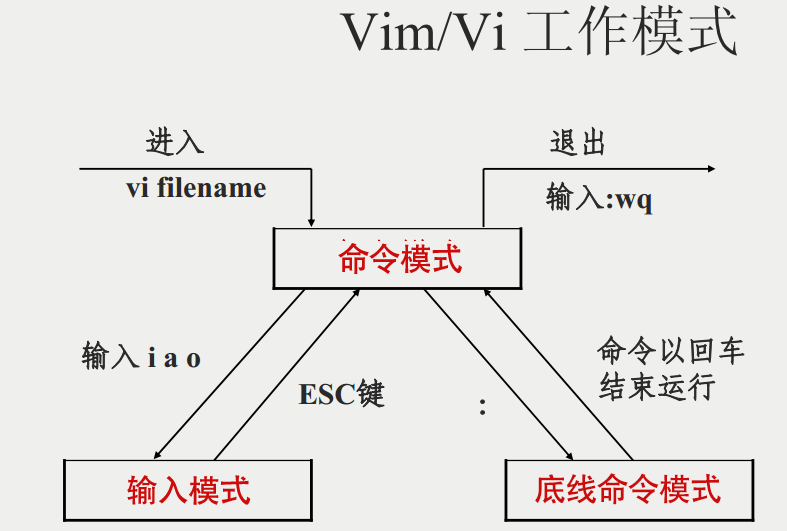
Vim没有菜单,只有命令

  • 命令模式

  • 插入模式 输入aio

  • 编辑模式

vi/vim 的使用#

基本上 vi/vim 共分为三种模式,分别是命令模式(Command mode)输入模式(Insert mode)底线命令模式(Last line mode)。 这三种模式的作用分别是:

命令模式:#

用户刚刚启动 vi/vim,便进入了命令模式。

此状态下敲击键盘动作会被Vim识别为命令,而非输入字符。比如我们此时按下i,并不会输入一个字符,i被当作了一个命令。

以下是常用的几个命令:

  • i 切换到输入模式,以输入字符。

  • x 删除当前光标所在处的字符。

  • : 切换到底线命令模式,以在最底一行输入命令。

若想要编辑文本:启动Vim,进入了命令模式,按下i,切换到输入模式。

命令模式只有一些最基本的命令,因此仍要依靠底线命令模式输入更多命令。

输入模式#

在命令模式下按下i就进入了输入模式。

在输入模式中,可以使用以下按键:

  • 字符按键以及Shift组合,输入字符

  • ENTER,回车键,换行

  • BACK SPACE,退格键,删除光标前一个字符

  • DEL,删除键,删除光标后一个字符

  • 方向键,在文本中移动光标

  • HOME/END,移动光标到行首/行尾

  • Page Up/Page Down,上/下翻页

  • Insert,切换光标为输入/替换模式,光标将变成竖线/下划线

  • ESC,退出输入模式,切换到命令模式

底线命令模式#

在命令模式下按下:(英文冒号)就进入了底线命令模式。

底线命令模式可以输入单个或多个字符的命令,可用的命令非常多。

在底线命令模式中,基本的命令有(已经省略了冒号):

  • q 退出程序

  • w 保存文件

按ESC键可随时退出底线命令模式。

简单的说,我们可以将这三个模式想成底下的图标来表示:

img

#

1
2
3
4
5
6
7
8
9
10
11
12
13
14
15
help.txt        For Vim version 7.4.  Last change: 2012 Dec 06

VIM - main help file
k
Move around: Use the cursor keys, or "h" to go left, h l
"j" to go down, "k" to go up, "l" to go right. j
Close this window: Use ":q<Enter>".
Get out of Vim: Use ":qa!<Enter>" (careful, all changes are lost!).

Jump to a subject: Position the cursor on a tag (e.g. bars) and hit CTRL-].
With the mouse: ":set mouse=a" to enable the mouse (in xterm or GUI).
Double-click the left mouse button on a tag, e.g. bars.
Jump back: Type CTRL-T or CTRL-O (repeat to go further back).

Get specific help: It is possible to go directly to whatever you want help
1
2
# 显示行号
$ :set nu

image-20211222212124909

image-20211222212149195

image-20211222212707820

image-20211222212915996

使用技巧#

将 date命令返回的结果,写入文件中.

image-20211222214756084

npm包管理

  • 包全名 – 未安装的软件包,使用包全名,且要注意路径

  • 包名 – /var/lib/rpm/中的数据库 , 已安装的软件包

rpm -ivh#

$ rpm -ivh 全包名 #rpm包安装

  • -i 安装 install

  • -v 显示详细信息 verbose

  • -h 显示进度 hash

  • -nodeps 不检测依赖性

rpm -Uvh#

$ rpm -Uvh 包名 #rpm包升级

  • -U Update

rpm -e#

$ rpm -e 包名 # 卸载包

  • -e 卸载 erase

  • --nodeps 不检测依赖性

rpm -q*#

$ rpm -q 包名 # 查询是否安装

  • -q 查询 query

  • -a 查看全部已安装的包 all

1
2
3
4
5
6
7
8
9
10
11
12
13
14
15
16
17
18
19
20
21
22
23
24
25
26
27
28
29
30
31
32
33
34
35
36
37
38
39
40
41
42
43
44
45
46
47
48
49
50
51
52
53
54
55
56
57
58
59
60
61
62
63
64
65
66
67
68
69
70
71
72
73
74
75
76
77
78
79
80
81
82
83
84
85
86
[root@VM-0-9-centos ~]# rpm -q yum
未安装软件包 yum
[root@VM-0-9-centos ~]# rpm -qa
ustr-1.0.4-16.el7.x86_64
libselinux-devel-2.5-15.el7.x86_64
libdaemon-0.14-7.el7.x86_64
libXft-2.3.2-2.el7.x86_64
python-2.7.5-90.el7.x86_64
keyutils-libs-devel-1.5.8-3.el7.x86_64
ncurses-5.9-14.20130511.el7_4.x86_64
iptables-1.4.21-35.el7.x86_64
tk-devel-8.5.13-6.el7.x86_64
hostname-3.13-3.el7_7.1.x86_64
satyr-0.13-15.el7.x86_64
libdb4-devel-4.8.30-13.el7.x86_64
info-5.1-5.el7.x86_64
......
# 查出所有带有python关键字的软件包
[root@VM-0-9-centos ~]# rpm -qa | grep python
python-2.7.5-90.el7.x86_64
abrt-python-2.1.11-60.el7.centos.x86_64
python-slip-dbus-0.4.0-4.el7.noarch
newt-python-0.52.15-4.el7.x86_64
python-iniparse-0.4-9.el7.noarch
python-configobj-4.7.2-7.el7.noarch
python-jinja2-2.7.2-4.el7.noarch
python-ipaddress-1.0.16-2.el7.noarch
.......
# 查询已安装相关信息.
[root@VM-0-9-centos ~]# rpm -qi python
Name : python
Version : 2.7.5
Release : 90.el7
Architecture: x86_64
Install Date: 2021年01月19日 星期二 18时23分40秒
Group : Development/Languages
Size : 80835
License : Python
Signature : RSA/SHA256, 2020年11月18日 星期三 22时19分50秒, Key ID 24c6a8a7f4a80eb5
Source RPM : python-2.7.5-90.el7.src.rpm
Build Date : 2020年11月17日 星期二 06时47分32秒
Build Host : x86-01.bsys.centos.org
Relocations : (not relocatable)
Packager : CentOS BuildSystem <http://bugs.centos.org>
Vendor : CentOS
URL : http://www.python.org/
Summary : An interpreted, interactive, object-oriented programming language
Description :
Python is an interpreted, interactive, object-oriented programming
language often compared to Tcl, Perl, Scheme or Java. Python includes
modules, classes, exceptions, very high level dynamic data types and
dynamic typing. Python supports interfaces to many system calls and
libraries, as well as to various windowing systems (X11, Motif, Tk,
Mac and MFC).

Programmers can write new built-in modules for Python in C or C++.
Python can be used as an extension language for applications that need
a programmable interface.

Note that documentation for Python is provided in the python-docs
package.

This package provides the "python" executable; most of the actual
implementation is within the "python-libs" package.
# -p 查询未安装软件包信息
[root@VM-0-9-centos ~]# rpm -qip yum-cron-3.4.3-168.el7.centos.noarch.rpm
Name : yum-cron
Version : 3.4.3
Release : 168.el7.centos
Architecture: noarch
Install Date: (not installed)
Group : System Environment/Base
Size : 52190
License : GPLv2+
Signature : RSA/SHA256, 2020年10月15日 星期四 03时21分12秒, Key ID 24c6a8a7f4a80eb5
Source RPM : yum-3.4.3-168.el7.centos.src.rpm
Build Date : 2020年10月02日 星期五 01时03分49秒
Build Host : x86-02.bsys.centos.org
Relocations : (not relocatable)
Packager : CentOS BuildSystem <http://bugs.centos.org>
Vendor : CentOS
URL : http://yum.baseurl.org/
Summary : Files needed to run yum updates as a cron job
Description :
These are the files needed to run yum updates as a cron job.
Install this package if you want auto yum updates nightly via cron.

rpm -ql#

  • -l 列表 list

1
2
3
4
5
6
7
8
9
10
11
12
13
14
15
16
17
18
19
20
21
22
23
24
# 查询已安装软件包的位置
[root@VM-0-9-centos ~]# rpm -ql python
/usr/bin/pydoc
/usr/bin/python
/usr/bin/python2
/usr/bin/python2.7
/usr/libexec/platform-python
/usr/share/doc/python-2.7.5
/usr/share/doc/python-2.7.5/LICENSE
/usr/share/doc/python-2.7.5/README
/usr/share/man/man1/python.1.gz
/usr/share/man/man1/python2.1.gz
/usr/share/man/man1/python2.7.1.gz
# -p 查询未安装的软件包,默认安装位置.
[root@VM-0-9-centos ~]# rpm -qlp yum-cron-3.4.3-168.el7.centos.noarch.rpm
/etc/cron.daily/0yum-daily.cron
/etc/cron.hourly/0yum-hourly.cron
/etc/yum/yum-cron-hourly.conf
/etc/yum/yum-cron.conf
/usr/lib/systemd/system/yum-cron.service
/usr/sbin/yum-cron
/usr/share/doc/yum-cron-3.4.3
/usr/share/doc/yum-cron-3.4.3/COPYING
/usr/share/man/man8/yum-cron.8

rpm -qf#

1
2
3
4
5
6
7
8
9
10
11
12
13
14
15
[root@VM-0-9-centos ~]#  rpm -ql python
/usr/bin/pydoc
/usr/bin/python
/usr/bin/python2
/usr/bin/python2.7
/usr/libexec/platform-python
/usr/share/doc/python-2.7.5
/usr/share/doc/python-2.7.5/LICENSE
/usr/share/doc/python-2.7.5/README
/usr/share/man/man1/python.1.gz
/usr/share/man/man1/python2.1.gz
/usr/share/man/man1/python2.7.1.gz
# 反向查询 '系统文件' 属于哪一个软件包下.
[root@VM-0-9-centos ~]# rpm -qf /usr/share/man/man1/python2.7.1.gz
python-2.7.5-90.el7.x86_64
1
2
3
4
5
6
7
8
9
10
11
12
13
14
15
16
17
18
19
20
21
22
23
24
25
[root@VM-0-9-centos rpm]# rpm
RPM 版本 4.11.3
版权所有 (C) 1998-2002 - 红帽公司。
该程序可以在 GNU GPL 条款下自由分发

用法: rpm [-aKfgpqVcdLilsiv?] [-a|--all] [-f|--file] [-g|--group] [-p|--package] [--pkgid] [--hdrid]
[--triggeredby] [--whatrequires] [--whatprovides] [--nomanifest] [-c|--configfiles]
[-d|--docfiles] [-L|--licensefiles] [--dump] [-l|--list] [--queryformat=QUERYFORMAT]
[-s|--state] [--nofiledigest] [--nofiles] [--nodeps] [--noscript] [--allfiles]
[--allmatches] [--badreloc] [-e|--erase <package>+] [--excludedocs] [--excludepath=<path>]
[--force] [-F|--freshen <packagefile>+] [-h|--hash] [--ignorearch] [--ignoreos]
[--ignoresize] [-i|--install] [--justdb] [--nodeps] [--nofiledigest] [--nocontexts]
[--noorder] [--noscripts] [--notriggers] [--nocollections] [--oldpackage] [--percent]
[--prefix=<dir>] [--relocate=<old>=<new>] [--replacefiles] [--replacepkgs] [--test]
[-U|--upgrade <packagefile>+] [--reinstall=<packagefile>+] [-D|--define “MACRO EXPR”]
[--undefine=MACRO] [-E|--eval “EXPR”] [--macros=<FILE:…>] [--noplugins] [--nodigest]
[--nosignature] [--rcfile=<FILE:…>] [-r|--root ROOT] [--dbpath=DIRECTORY] [--querytags]
[--showrc] [--quiet] [-v|--verbose] [--version] [-?|--help] [--usage] [--scripts]
[--setperms] [--setugids] [--setcaps] [--restore] [--conflicts] [--obsoletes]
[--provides] [--requires] [--info] [--changelog] [--xml] [--triggers] [--last] [--dupes]
[--filesbypkg] [--fileclass] [--filecolor] [--fscontext] [--fileprovide] [--filerequire]
[--filecaps]
# -p 查看未安装软件包的依赖性
[root@VM-0-9-centos rpm]# rpm -qRp yum-cron-3.4.3-168.el7.centos.noarch.rpm
错误:打开 yum-cron-3.4.3-168.el7.centos.noarch.rpm 失败: 没有那个文件或目录

rpm -V#

1
2
3
4
5
6
# 查看软件包是否被修改,无信息表示未被修改.
[root@VM-0-9-centos rpm]# rpm -V python
[root@VM-0-9-centos rpm]# rpm -V yum
未安装软件包 yum
[root@VM-0-9-centos rpm]# rpm -V httped
未安装软件包 httped

image-20211226133114942

image-20211226133322261

rpm2cpio 全包名 | \ cpio -idv .文件绝对路径#

  • | 管道符

  • \ 表示换行,一行命令为输入完全

  • . 表示文件

rpm包中文件提取 , 一般用于误删除的修复.

  • rpm2cpio 将rpm包转换为cpio格式的命令

  • cpio 标准工具,用于创建软件档案文件和冲档案中提取文件

$ cpio 选项 < [文件] [设备]

yum管理

image-20211226135954726

1
2
3
4
5
6
7
8
9
10
11
12
13
14
15
16
17
18
19
20
21
22
23
24
25
26
27
28
29
30
31
32
33
34
35
36
37
38
39
40
41
42
43
44
45
46
47
48
49
50
51
52
53
54
55
56
57
58
59
60
61
62
63
64
65
66
67
68
69
70
71
72
73
74
75
76
77
78
79
80
81
82
83
84
85
86
87
88
89
90
91
92
93
94
95
96
97
98
99
100
# 已安装yum 
[root@bogon ~]# yum -v
加载 "fastestmirror" 插件
Config time: 0.030
Yum version: 3.4.3
您需要给出命令
Usage: yum [options] COMMAND

List of Commands:

check 检查 RPM 数据库问题
check-update 检查是否有可用的软件包更新
clean 删除缓存数据
deplist 列出软件包的依赖关系
distribution-synchronization 已同步软件包到最新可用版本
downgrade 降级软件包
erase 从系统中移除一个或多个软件包
fs Acts on the filesystem data of the host, mainly for removing docs/lanuages for minimal hosts.
fssnapshot Creates filesystem snapshots, or lists/deletes current snapshots.
groups 显示或使用、组信息
help 显示用法提示
history 显示或使用事务历史
info 显示关于软件包或组的详细信息
install 向系统中安装一个或多个软件包
list 列出一个或一组软件包
load-transaction 从文件名中加载一个已存事务
makecache 创建元数据缓存
provides 查找提供指定内容的软件包
reinstall 覆盖安装软件包
repo-pkgs 将一个源当作一个软件包组,这样我们就可以一次性安装/移除全部软件包。
repolist 显示已配置的源
search 在软件包详细信息中搜索指定字符串
shell 运行交互式的 yum shell
swap Simple way to swap packages, instead of using shell
update 更新系统中的一个或多个软件包
update-minimal Works like upgrade, but goes to the 'newest' package match which fixes a problem that affects your system
updateinfo Acts on repository update information
upgrade 更新软件包同时考虑软件包取代关系
version 显示机器和/或可用的源版本。


Options:
-h, --help 显示此帮助消息并退出
-t, --tolerant 忽略错误
-C, --cacheonly 完全从系统缓存运行,不升级缓存
-c [config file], --config=[config file]
配置文件路径
-R [minutes], --randomwait=[minutes]
命令最长等待时间
-d [debug level], --debuglevel=[debug level]
调试输出级别
--showduplicates 在 list/search 命令下,显示源里重复的条目
-e [error level], --errorlevel=[error level]
错误输出级别
--rpmverbosity=[debug level name]
RPM 调试输出级别
-q, --quiet 静默执行
-v, --verbose 详尽的操作过程
-y, --assumeyes 回答全部问题为是
--assumeno 回答全部问题为否
--version 显示 Yum 版本然后退出
--installroot=[path] 设置安装根目录
--enablerepo=[repo] 启用一个或多个软件源(支持通配符)
--disablerepo=[repo] 禁用一个或多个软件源(支持通配符)
-x [package], --exclude=[package]
采用全名或通配符排除软件包
--disableexcludes=[repo]
禁止从主配置,从源或者从任何位置排除
--disableincludes=[repo]
disable includepkgs for a repo or for everything
--obsoletes 更新时处理软件包取代关系
--noplugins 禁用 Yum 插件
--nogpgcheck 禁用 GPG 签名检查
--disableplugin=[plugin]
禁用指定名称的插件
--enableplugin=[plugin]
启用指定名称的插件
--skip-broken 忽略存在依赖关系问题的软件包
--color=COLOR 配置是否使用颜色
--releasever=RELEASEVER
在 yum 配置和 repo 文件里设置 $releasever 的值
--downloadonly 仅下载而不更新
--downloaddir=DLDIR 指定一个其他文件夹用于保存软件包
--setopt=SETOPTS 设置任意配置和源选项
--bugfix Include bugfix relevant packages, in updates
--security Include security relevant packages, in updates
--advisory=ADVS, --advisories=ADVS
Include packages needed to fix the given advisory, in
updates
--bzs=BZS Include packages needed to fix the given BZ, in
updates
--cves=CVES Include packages needed to fix the given CVE, in
updates
--sec-severity=SEVS, --secseverity=SEVS
Include security relevant packages matching the
severity, in updates

# 未安装
[root@VM-0-9-centos ~]# yum -v
-bash: yum: 未找到命令

IP地址配置与yum源配置

1
2
3
4
5
6
7
8
9
10
11
12
13
14
15
16
17
18
19
20
21
22
23
24
25
26
27
28
29
30
31
32
33
34
35
36
37
38
39
40
41
42
43
44
45
46
# 查看配置文件
[root@bogon ~]# cat /etc/yum.repos.d/CentOS-Base.repo
# CentOS-Base.repo
#
# The mirror system uses the connecting IP address of the client and the
# update status of each mirror to pick mirrors that are updated to and
# geographically close to the client. You should use this for CentOS updates
# unless you are manually picking other mirrors.
#
# If the mirrorlist= does not work for you, as a fall back you can try the
# remarked out baseurl= line instead.
#
#

[base] # 容器名
name=CentOS-$releasever - Base
mirrorlist=http://mirrorlist.centos.org/?release=$releasever&arch=$basearch&repo=os&infra=$infra
#baseurl=http://mirror.centos.org/centos/$releasever/os/$basearch/
gpgcheck=1
gpgkey=file:///etc/pki/rpm-gpg/RPM-GPG-KEY-CentOS-7

#released updates
[updates]
name=CentOS-$releasever - Updates
mirrorlist=http://mirrorlist.centos.org/?release=$releasever&arch=$basearch&repo=updates&infra=$infra
#baseurl=http://mirror.centos.org/centos/$releasever/updates/$basearch/
gpgcheck=1
gpgkey=file:///etc/pki/rpm-gpg/RPM-GPG-KEY-CentOS-7

#additional packages that may be useful
[extras]
name=CentOS-$releasever - Extras
mirrorlist=http://mirrorlist.centos.org/?release=$releasever&arch=$basearch&repo=extras&infra=$infra
#baseurl=http://mirror.centos.org/centos/$releasever/extras/$basearch/
gpgcheck=1
gpgkey=file:///etc/pki/rpm-gpg/RPM-GPG-KEY-CentOS-7

#additional packages that extend functionality of existing packages
[centosplus]
name=CentOS-$releasever - Plus
mirrorlist=http://mirrorlist.centos.org/?release=$releasever&arch=$basearch&repo=centosplus&infra=$infra
#baseurl=http://mirror.centos.org/centos/$releasever/centosplus/$basearch/
gpgcheck=1
enabled=0
gpgkey=file:///etc/pki/rpm-gpg/RPM-GPG-KEY-CentOS-7

yum list#

1
2
3
4
5
6
7
8
9
10
# 查询yum源可安装的软件包列表
$ yum list
alsa-plugins-maemo.x86_64 1.1.6-1.el7 base
alsa-plugins-oss.i686 1.1.6-1.el7 base
alsa-plugins-oss.x86_64 1.1.6-1.el7 base
alsa-plugins-pulseaudio.i686 1.1.6-1.el7 base
alsa-plugins-pulseaudio.x86_64 1.1.6-1.el7 base
alsa-plugins-samplerate.i686 1.1.6-1.el7 base
alsa-plugins-samplerate.x86_64 1.1.6-1.el7 base
.......
1
2
3
4
5
6
7
8
9
10
11
12
13
14
15
16
17
18
19
20
21
22
23
24
25
26
27
28
29
30
31
32
33
34
35
36
# 搜索软件包
[root@bogon ~]# yum search gcc
已加载插件:fastestmirror
Repodata is over 2 weeks old. Install yum-cron? Or run: yum makecache fast
Loading mirror speeds from cached hostfile
* base: mirrors.bupt.edu.cn
* extras: mirrors.bupt.edu.cn
* updates: mirrors.neusoft.edu.cn
=========================================== N/S matched: gcc ===========================================
gcc-c++.x86_64 : C++ support for GCC
gcc-gnat.x86_64 : Ada 95 support for GCC
gcc-objc.x86_64 : Objective-C support for GCC
gcc-objc++.x86_64 : Objective-C++ support for GCC
gcc-plugin-devel.x86_64 : Support for compiling GCC plugins
libgcc.i686 : GCC version 4.8 shared support library
libgcc.x86_64 : GCC version 4.8 shared support library
relaxngcc-javadoc.noarch : Javadoc for relaxngcc
compat-gcc-44.x86_64 : Compatibility GNU Compiler Collection
compat-gcc-44-c++.x86_64 : C++ support for compatibility compiler
compat-gcc-44-gfortran.x86_64 : Fortran support for compatibility compiler
gcc.x86_64 : Various compilers (C, C++, Objective-C, Java, ...)
gcc-gfortran.x86_64 : Fortran support
gcc-go.x86_64 : Go support
libgomp.i686 : GCC OpenMP v3.0 shared support library
libgomp.x86_64 : GCC OpenMP v3.0 shared support library
libmudflap.i686 : GCC mudflap shared support library
libmudflap.x86_64 : GCC mudflap shared support library
libmudflap-devel.i686 : GCC mudflap support
libmudflap-devel.x86_64 : GCC mudflap support
libquadmath.i686 : GCC __float128 shared support library
libquadmath.x86_64 : GCC __float128 shared support library
libquadmath-devel.i686 : GCC __float128 support
libquadmath-devel.x86_64 : GCC __float128 support
relaxngcc.noarch : RELAX NG Compiler Compiler

名称和简介匹配 only,使用“search all”试试。

yum install#

  • -y 自动回答yes

1
2
3
4
5
6
7
8
9
10
11
12
13
14
15
16
17
18
19
20
21
22
23
24
25
26
27
28
29
30
31
32
33
34
35
36
37
38
39
40
41
42
43
44
45
46
47
48
49
50
51
52
53
54
55
56
57
58
59
60
61
62
63
64
65
66
67
68
69
70
71
72
73
74
75
76
77
78
79
80
81
82
83
84
85
86
87
88
89
90
91
92
93
94
95
96
97
98
99
100
101
102
103
104
105
106
107
108
109
110
111
112
113
114
115
# 安装c语言编译器gcc
[root@bogon ~]# yum -y install gcc
已加载插件:fastestmirror
Loading mirror speeds from cached hostfile
* base: mirrors.bupt.edu.cn
* extras: mirrors.bupt.edu.cn
* updates: mirrors.neusoft.edu.cn
base | 3.6 kB 00:00:00
extras | 2.9 kB 00:00:00
updates | 2.9 kB 00:00:00
updates/7/x86_64/primary_db | 13 MB 00:00:19
正在解决依赖关系
--> 正在检查事务
---> 软件包 gcc.x86_64.0.4.8.5-44.el7 将被 安装
--> 正在处理依赖关系 cpp = 4.8.5-44.el7,它被软件包 gcc-4.8.5-44.el7.x86_64 需要
--> 正在处理依赖关系 glibc-devel >= 2.2.90-12,它被软件包 gcc-4.8.5-44.el7.x86_64 需要
--> 正在处理依赖关系 libmpfr.so.4()(64bit),它被软件包 gcc-4.8.5-44.el7.x86_64 需要
--> 正在处理依赖关系 libmpc.so.3()(64bit),它被软件包 gcc-4.8.5-44.el7.x86_64 需要
--> 正在检查事务
---> 软件包 cpp.x86_64.0.4.8.5-44.el7 将被 安装
---> 软件包 glibc-devel.x86_64.0.2.17-325.el7_9 将被 安装
--> 正在处理依赖关系 glibc-headers = 2.17-325.el7_9,它被软件包 glibc-devel-2.17-325.el7_9.x86_64 需要
--> 正在处理依赖关系 glibc = 2.17-325.el7_9,它被软件包 glibc-devel-2.17-325.el7_9.x86_64 需要
--> 正在处理依赖关系 glibc-headers,它被软件包 glibc-devel-2.17-325.el7_9.x86_64 需要
---> 软件包 libmpc.x86_64.0.1.0.1-3.el7 将被 安装
---> 软件包 mpfr.x86_64.0.3.1.1-4.el7 将被 安装
--> 正在检查事务
---> 软件包 glibc.x86_64.0.2.17-317.el7 将被 升级
--> 正在处理依赖关系 glibc = 2.17-317.el7,它被软件包 glibc-common-2.17-317.el7.x86_64 需要
---> 软件包 glibc.x86_64.0.2.17-325.el7_9 将被 更新
---> 软件包 glibc-headers.x86_64.0.2.17-325.el7_9 将被 安装
--> 正在处理依赖关系 kernel-headers >= 2.2.1,它被软件包 glibc-headers-2.17-325.el7_9.x86_64 需要
--> 正在处理依赖关系 kernel-headers,它被软件包 glibc-headers-2.17-325.el7_9.x86_64 需要
--> 正在检查事务
---> 软件包 glibc-common.x86_64.0.2.17-317.el7 将被 升级
---> 软件包 glibc-common.x86_64.0.2.17-325.el7_9 将被 更新
---> 软件包 kernel-headers.x86_64.0.3.10.0-1160.49.1.el7 将被 安装
--> 解决依赖关系完成

依赖关系解决

========================================================================================================
Package 架构 版本 源 大小
========================================================================================================
正在安装:
gcc x86_64 4.8.5-44.el7 base 16 M
为依赖而安装:
cpp x86_64 4.8.5-44.el7 base 5.9 M
glibc-devel x86_64 2.17-325.el7_9 updates 1.1 M
glibc-headers x86_64 2.17-325.el7_9 updates 691 k
kernel-headers x86_64 3.10.0-1160.49.1.el7 updates 9.0 M
libmpc x86_64 1.0.1-3.el7 base 51 k
mpfr x86_64 3.1.1-4.el7 base 203 k
为依赖而更新:
glibc x86_64 2.17-325.el7_9 updates 3.6 M
glibc-common x86_64 2.17-325.el7_9 updates 12 M

事务概要
========================================================================================================
安装 1 软件包 (+6 依赖软件包)
升级 ( 2 依赖软件包)

总下载量:48 M
Downloading packages:
Delta RPMs disabled because /usr/bin/applydeltarpm not installed.
(1/9): glibc-devel-2.17-325.el7_9.x86_64.rpm | 1.1 MB 00:00:01
(2/9): glibc-headers-2.17-325.el7_9.x86_64.rpm | 691 kB 00:00:00
(3/9): kernel-headers-3.10.0-1160.49.1.el7.x86_64.rpm | 9.0 MB 00:00:04
(4/9): libmpc-1.0.1-3.el7.x86_64.rpm | 51 kB 00:00:00
(5/9): mpfr-3.1.1-4.el7.x86_64.rpm | 203 kB 00:00:00
(6/9): glibc-2.17-325.el7_9.x86_64.rpm | 3.6 MB 00:00:18
(7/9): cpp-4.8.5-44.el7.x86_64.rpm | 5.9 MB 00:00:23
(8/9): glibc-common-2.17-325.el7_9.x86_64.rpm | 12 MB 00:00:26
(9/9): gcc-4.8.5-44.el7.x86_64.rpm | 16 MB 00:00:28
--------------------------------------------------------------------------------------------------------
总计 1.7 MB/s | 48 MB 00:00:28
Running transaction check
Running transaction test
Transaction test succeeded
Running transaction
正在更新 : glibc-2.17-325.el7_9.x86_64 1/11
正在更新 : glibc-common-2.17-325.el7_9.x86_64 2/11
正在安装 : mpfr-3.1.1-4.el7.x86_64 3/11
正在安装 : libmpc-1.0.1-3.el7.x86_64 4/11
正在安装 : cpp-4.8.5-44.el7.x86_64 5/11
正在安装 : kernel-headers-3.10.0-1160.49.1.el7.x86_64 6/11
正在安装 : glibc-headers-2.17-325.el7_9.x86_64 7/11
正在安装 : glibc-devel-2.17-325.el7_9.x86_64 8/11
正在安装 : gcc-4.8.5-44.el7.x86_64 9/11
清理 : glibc-2.17-317.el7.x86_64 10/11
清理 : glibc-common-2.17-317.el7.x86_64 11/11
验证中 : mpfr-3.1.1-4.el7.x86_64 1/11
验证中 : glibc-devel-2.17-325.el7_9.x86_64 2/11
验证中 : gcc-4.8.5-44.el7.x86_64 3/11
验证中 : glibc-headers-2.17-325.el7_9.x86_64 4/11
验证中 : kernel-headers-3.10.0-1160.49.1.el7.x86_64 5/11
验证中 : libmpc-1.0.1-3.el7.x86_64 6/11
验证中 : glibc-common-2.17-325.el7_9.x86_64 7/11
验证中 : glibc-2.17-325.el7_9.x86_64 8/11
验证中 : cpp-4.8.5-44.el7.x86_64 9/11
验证中 : glibc-2.17-317.el7.x86_64 10/11
验证中 : glibc-common-2.17-317.el7.x86_64 11/11

已安装:
gcc.x86_64 0:4.8.5-44.el7

作为依赖被安装:
cpp.x86_64 0:4.8.5-44.el7 glibc-devel.x86_64 0:2.17-325.el7_9
glibc-headers.x86_64 0:2.17-325.el7_9 kernel-headers.x86_64 0:3.10.0-1160.49.1.el7
libmpc.x86_64 0:1.0.1-3.el7 mpfr.x86_64 0:3.1.1-4.el7

作为依赖被升级:
glibc.x86_64 0:2.17-325.el7_9 glibc-common.x86_64 0:2.17-325.el7_9

完毕!

yum -y update#

升级包名

  • 注意! yum update 如果后不加包名,默认升级全部软件,包括Linux内核,可能会导致远程服务器无法正常运行.

  • 慎用

yum -y remove#

  • 注意 yum remove 卸载软件将会自动卸载所依赖的所有软件!!!

  • 慎用

yum grouplist#

1
2
3
4
5
6
7
8
9
10
11
12
13
14
15
16
17
18
19
20
21
22
23
24
25
26
27
28
29
30
31
32
# 显示所有可用的软件包组
[root@bogon ~]# yum grouplist
已加载插件:fastestmirror
没有安装组信息文件
Maybe run: yum groups mark convert (see man yum)
Loading mirror speeds from cached hostfile
* base: mirrors.bupt.edu.cn
* extras: mirrors.bupt.edu.cn
* updates: mirrors.neusoft.edu.cn
可用的环境分组:
最小安装
基础设施服务器
计算节点
文件及打印服务器
基本网页服务器
虚拟化主机
带 GUI 的服务器
GNOME 桌面
KDE Plasma Workspaces
开发及生成工作站
可用组:
传统 UNIX 兼容性
兼容性程序库
图形管理工具
安全性工具
开发工具
控制台互联网工具
智能卡支持
科学记数法支持
系统管理
系统管理工具
完成

以本地光盘作为yum源#

RPM包默认安装位置#

image-20211226183626980

服务管理命令 service 服务名 start 启动服务

  • 在默认安装位置寻找服务

源码安装

  • 源代码保存位置 /usr/local/src/

  • 软件安装位置 /usr/local/

  • 安装报错条件: 二者缺一不可

    • 安装停止
    • 出现error , no 等提示

make 编译

make install 编译安装

源码包卸载: 直接删除源码包安装所在目录即可

脚本安装

用户(组)管理

Shell 是Linux默认命令解释器.

  • 用户信息文件 /etc/passwd

  • 影子文件 /etc/shadow

  • 组信息文件 /etc/group

  • 组密码文件 /etc/gshadow

字段说明

root:x:0:0:root:/root:/bin/bash

  1. 用户名

  2. 密码标识x 标示存在密码

  3. 数字标识UID

0 超级用户

1~499 系统用户(伪用户),不能登录,不能删除.

500~65535 普通用户

  1. 用户初始组ID --GID

  2. 用户说明(备注)

  3. 家目录–初始登录位置

普通用户: /home/用户名

超级用户: /root

  1. shell默认命令解释器 /bin/bash

1
2
3
4
5
6
7
8
9
10
11
12
13
14
15
16
17
18
19
20
21
22
23
24
# 用户配置文件信息
[root@bogon ~]# cat /etc/passwd
#用户名:密码标志:数字标识:
root:x:0:0:root:/root:/bin/bash
bin:x:1:1:bin:/bin:/sbin/nologin
daemon:x:2:2:daemon:/sbin:/sbin/nologin
adm:x:3:4:adm:/var/adm:/sbin/nologin
lp:x:4:7:lp:/var/spool/lpd:/sbin/nologin
sync:x:5:0:sync:/sbin:/bin/sync
shutdown:x:6:0:shutdown:/sbin:/sbin/shutdown
halt:x:7:0:halt:/sbin:/sbin/halt
mail:x:8:12:mail:/var/spool/mail:/sbin/nologin
operator:x:11:0:operator:/root:/sbin/nologin
games:x:12:100:games:/usr/games:/sbin/nologin
ftp:x:14:50:FTP User:/var/ftp:/sbin/nologin
nobody:x:99:99:Nobody:/:/sbin/nologin
systemd-network:x:192:192:systemd Network Management:/:/sbin/nologin
dbus:x:81:81:System message bus:/:/sbin/nologin
polkitd:x:999:998:User for polkitd:/:/sbin/nologin
sshd:x:74:74:Privilege-separated SSH:/var/empty/sshd:/sbin/nologin
postfix:x:89:89::/var/spool/postfix:/sbin/nologin
chrony:x:998:996::/var/lib/chrony:/sbin/nologin
tiam_beta:x:1000:1000:Tiam_Beta:/home/tiam_beta:/bin/bash
tiam:x:1001:1001::/home/tiam:/bin/bash
1
2
3
4
5
6
7
8
9
10
11
12
13
14
15
16
17
18
19
20
# 查看配置文件帮助
$ man passwd
PASSWD(1) User utilities PASSWD(1)

NAME
passwd - update user's authentication tokens

SYNOPSIS
passwd [-k] [-l] [-u [-f]] [-d] [-e] [-n mindays] [-x maxdays] [-w warndays] [-i inactivedays]
[-S] [--stdin] [username]

DESCRIPTION
The passwd utility is used to update user's authentication token(s).

This task is achieved through calls to the Linux-PAM and Libuser API. Essentially, it ini‐
tializes itself as a "passwd" service with Linux-PAM and utilizes configured password modules
to authenticate and then update a user's password.

A simple entry in the global Linux-PAM configuration file for this service would be:
......
1
2
3
4
5
# 无操作权限,密码存放地址,只有root用户可查看.
[root@bogon etc]# ll /etc/shadow
----------. 1 root root 839 12月 16 01:25 /etc/shadow
[root@bogon etc]# ll /etc/passwd
-rw-r--r--. 1 root root 943 12月 16 01:20 /etc/passwd

字段说明

  1. 用户名

  2. SHA512散列加密算法 加密的密码

!* 则不能登录

3. 密码最后修改日期

1970年1月1日起 , 每过一天加 1

  1. 密码间隔 , 规定密码修改的时间间隔.单位天

  2. 密码生效时间, 则生效时间过后必须更改密码.

  3. 到期前警告时间.

  4. 密码到期之后的可延期时间.

0: 密码过期立即失效

-1:密码永不失效

  1. 账号失效时间 , 以时间戳表示.

  2. 保留

1
2
3
4
5
6
7
8
9
10
11
12
13
14
15
16
17
18
19
20
21
22
[root@bogon etc]# cat /etc/shadow
root:$6$v39kajRiQ7R.ifft$KkJZJT.3M8ef6T/MB53GaCFcbNt3dsO17lkhNRhIrijOS1rKYI5x8Wkx7iBRkXpkyWQKKG6.s2.Y5fnbxiC7C/::0:99999:7:::
bin:*:18353:0:99999:7:::
daemon:*:18353:0:99999:7:::
adm:*:18353:0:99999:7:::
lp:*:18353:0:99999:7:::
sync:*:18353:0:99999:7:::
shutdown:*:18353:0:99999:7:::
halt:*:18353:0:99999:7:::
mail:*:18353:0:99999:7:::
operator:*:18353:0:99999:7:::
games:*:18353:0:99999:7:::
ftp:*:18353:0:99999:7:::
nobody:*:18353:0:99999:7:::
systemd-network:!!:18968::::::
dbus:!!:18968::::::
polkitd:!!:18968::::::
sshd:!!:18968::::::
postfix:!!:18968::::::
chrony:!!:18968::::::
tiam_beta:$6$Bo705/gRY3GbW3Zo$v39G56h686s/bY0rvxlSvBHUV/nzAl40UNGlLbhgVGX1kLRsOUVKUobRlPo0gzlf9I/Jmnklyh/WGDg9HCniS/::0:99999:7:::
tiam:$6$4UGm5os7$HK.tR.wNXG9LW.QYzbkCEqmRTHrJTzeKpAgEOqtnNfQba7qAZk55Y2jzT.lCK2cm0nq3ST.PyWB7cRNhXo/CU.:18976:0:99999:7:::
1
2
3
# 时间戳转换
[root@bogon etc]# date -d "1970-01-01 18968 days"
2021年 12月 07日 星期二 00:00:00 CST

group 组用户信息 ,字段说明

  1. 组名 默认以用户名相同

  2. 组密码标志

  3. GID 唯一标识,索引

  4. 组中附加用户

1
2
3
4
5
6
7
8
9
10
11
12
13
14
15
16
17
18
19
20
21
22
23
24
25
26
27
28
29
30
31
32
33
34
35
36
37
38
39
40
[root@bogon etc]# cat /etc/group
root:x:0:
bin:x:1:
daemon:x:2:
sys:x:3:
adm:x:4:
tty:x:5:
disk:x:6:
lp:x:7:
mem:x:8:
kmem:x:9:
wheel:x:10:
cdrom:x:11:
mail:x:12:postfix
man:x:15:
dialout:x:18:
floppy:x:19:
games:x:20:
tape:x:33:
video:x:39:
ftp:x:50:
lock:x:54:
audio:x:63:
nobody:x:99:
users:x:100:
utmp:x:22:
utempter:x:35:
input:x:999:
systemd-journal:x:190:
systemd-network:x:192:
dbus:x:81:
polkitd:x:998:
ssh_keys:x:997:
sshd:x:74:
postdrop:x:90:
postfix:x:89:
chrony:x:996:
tiam_beta:x:1000:tiam_beta
tiam:x:1001:
softwareclass:x:1002:

字段说明

  1. 组名

  2. 组密码

  3. 组管理员用户名

  4. 组中附加用户

1
2
3
4
5
6
7
8
9
10
11
12
13
14
15
16
17
18
19
20
21
22
23
24
25
26
27
28
29
30
31
32
33
34
35
36
37
38
39
40
[root@bogon etc]# cat /etc/gshadow
root:::
bin:::
daemon:::
sys:::
adm:::
tty:::
disk:::
lp:::
mem:::
kmem:::
wheel:::
cdrom:::
mail:::postfix
man:::
dialout:::
floppy:::
games:::
tape:::
video:::
ftp:::
lock:::
audio:::
nobody:::
users:::
utmp:!::
utempter:!::
input:!::
systemd-journal:!::
systemd-network:!::
dbus:!::
polkitd:!::
ssh_keys:!::
sshd:!::
postdrop:!::
postfix:!::
chrony:!::
tiam_beta:!!::tiam_beta
tiam:!::
softwareclass:!::

提示用户标识

# 提示为超级用户

$ 提示的为普通用户

1
2
3
4
5
6
7
8
9
10
11
12
# 用户默认邮箱位置
[root@VM-0-9-centos ~]# cd /var/spool/mail
[root@VM-0-9-centos mail]# ll
总用量 116
-rw-rw---- 1 lighthouse mail 0 10月 23 02:40 lighthouse
-rw-rw---- 1 mysql mail 0 10月 23 02:53 mysql
-rw-rw---- 1 redis mail 0 11月 5 15:21 redis
-rw------- 1 root mail 109450 12月 26 20:01 root
-rw-rw----. 1 rpc mail 0 3月 7 2019 rpc
-rw-rw---- 1 springboot mail 0 10月 23 11:21 springboot
-rw-rw---- 1 tiam mail 656 12月 22 20:33 tiam
-rw-rw---- 1 www mail 0 10月 23 02:51 www
1
2
# 添加用户时 默认产生的文件-->默认模板配置位置.
[root@VM-0-9-centos mail]# cd /etc/skel

新年快乐#

1
2
3
4
5
6
7
8
9
10
11
12
13
14
15
16
17
18
19
20
21
22
23
24
25
26
27
28
29
30
31
32
33
34
35
36
37
38
39
40
41
42
43
44
45
46
47
48
49
50
51
52
53
54
55
56
57
58
59
[root@iZbp1244h71ferqzghq7m4Z ~]# help
GNU bash, 版本 4.2.46(2)-release (x86_64-redhat-linux-gnu)
这些 shell 命令是内部定义的。请输入 `help' 以获取一个列表.
输入 `help 名称' 以得到有关函数`名称'的更多信息.
使用 `info bash' 来获得关于 shell 的更多一般性信息
使用 `man -k' 或 `info' 来获取不在列表中的命令的更多信息.

名称旁边的星号 (*) 意味着该命令被禁用.

job_spec [&] history [-c] [-d 偏移量] [n] 或 his>
(( 表达式 )) if 命令; then 命令; [ elif 命令; >
. 文件名 [参数] jobs [-lnprs] [任务声明 ...] 或 jo>
: kill [-s 信号声明 | -n 信号编号>
[ 参数... ] let 参数 [参数 ...]
[[ 表达式 ]] local [option] 名称[=值] ...
alias [-p] [名称[=值] ... ] logout [n]
bg [任务声明 ...] mapfile [-n 计数] [-O 起始序号] [>
bind [-lpvsPVS] [-m 键映射] [-f 文�> popd [-n] [+N | -N]
break [n] printf [-v var] 格式 [参数]
builtin [shell 内嵌 [参数 ...]] pushd [-n] [+N | -N | 目录]
caller [表达式] pwd [-LP]
case 词 in [模式 [| 模式]...) 命�> read [-ers] [-a 数组] [-d 分隔符] >
cd [-L|[-P [-e]]] [dir] readarray [-n 计数] [-O 起始序号]>
command [-pVv] 命令 [参数 ...] readonly [-aAf] [name[=value] ...] or r>
compgen [-abcdefgjksuv] [-o 选项] [-A> return [n]
complete [-abcdefgjksuv] [-pr] [-DE] [-o> select NAME [in 词语 ... ;] do 命令>
[root@iZbp1244h71ferqzghq7m4Z ~]# date
2022年 01月 02日 星期日 10:19:21 CST
[root@iZbp1244h71ferqzghq7m4Z ~]# cal
一月 2022
日 一 二 三 四 五 六
1
2 3 4 5 6 7 8
9 10 11 12 13 14 15
16 17 18 19 20 21 22
23 24 25 26 27 28 29
30 31
[root@iZbp1244h71ferqzghq7m4Z ~]# time

real 0m0.000s
user 0m0.000s
sys 0m0.000s
[root@iZbp1244h71ferqzghq7m4Z ~]# free
total used free shared buff/cache available
Mem: 3880180 302164 3270568 4344 307448 3354928
Swap: 0 0 0
[root@iZbp1244h71ferqzghq7m4Z ~]# df
文件系统 1K-块 已用 可用 已用% 挂载点
devtmpfs 1929540 0 1929540 0% /dev
tmpfs 1940088 0 1940088 0% /dev/shm
tmpfs 1940088 512 1939576 1% /run
tmpfs 1940088 0 1940088 0% /sys/fs/cgroup
/dev/vda1 41152812 7555752 31693352 20% /
tmpfs 388020 0 388020 0% /run/user/0
[root@iZbp1244h71ferqzghq7m4Z ~]# ls
oneinstack ReadMe
[root@iZbp1244h71ferqzghq7m4Z ~]# file oneinstack/
oneinstack/: directory
[root@iZbp1244h71ferqzghq7m4Z ~]# less ReadMe

查看命令帮助

1
2
3
4
5
6
7
8
9
10
11
12
13
14
15
16
17
18
19
20
21
22
23
24
25
26
27
28
29
30
31
32
33
34
35
36
37
38
39
40
41
42
43
44
45
46
47
48
49
50
51
52
53
54
55
56
57
58
59
60
61
62
63
64
65
66
67
68
69
70
71
72
73
74
75
76
77
78
79
80
81
[root@iZbp1244h71ferqzghq7m4Z ~]# type rm
rm 是 `rm -i' 的别名
[root@iZbp1244h71ferqzghq7m4Z ~]# which rm
alias rm='rm -i'
/usr/bin/rm
[root@iZbp1244h71ferqzghq7m4Z ~]# whatis rm
rm (1) - remove files or directories
[root@iZbp1244h71ferqzghq7m4Z ~]# man rm
[root@iZbp1244h71ferqzghq7m4Z ~]# info rm
[root@iZbp1244h71ferqzghq7m4Z ~]# apropos rm
usermod (8) - 修改一个用户账户
hashkit_murmur (3) - libhashkit Documentation
memrm (1) - libmemcached Documentation
zip_source_stat (3) - get information about zip_source
zip_stat (3) - get information about file
zip_stat_index (3) - get information about file
......
[root@iZbp1244h71ferqzghq7m4Z ~]# rm --help
用法:rm [选项]... 文件...
Remove (unlink) the FILE(s).

-f, --force ignore nonexistent files and arguments, never prompt
-i prompt before every removal
-I prompt once before removing more than three files, or
when removing recursively; less intrusive than -i,
while still giving protection against most mistakes
--interactive[=WHEN] prompt according to WHEN: never, once (-I), or
always (-i); without WHEN, prompt always
--one-file-system 递归删除一个层级时,跳过所有不符合命令行参
数的文件系统上的文件
--no-preserve-root do not treat '/' specially
--preserve-root do not remove '/' (default)
-r, -R, --recursive remove directories and their contents recursively
-d, --dir remove empty directories
-v, --verbose explain what is being done
--help 显示此帮助信息并退出
--version 显示版本信息并退出

默认时,rm 不会删除目录。使用--recursive(-r 或-R)选项可删除每个给定
的目录,以及其下所有的内容。

To remove a file whose name starts with a '-', for example '-foo',
use one of these commands:
rm -- -foo

rm ./-foo

请注意,如果使用rm 来删除文件,通常仍可以将该文件恢复原状。如果想保证
该文件的内容无法还原,请考虑使用shred。

GNU coreutils online help: <http://www.gnu.org/software/coreutils/>
请向<http://translationproject.org/team/zh_CN.html> 报告rm 的翻译错误
要获取完整文档,请运行:info coreutils 'rm invocation'
[root@iZbp1244h71ferqzghq7m4Z ~]# help cd
cd: cd [-L|[-P [-e]]] [dir]
Change the shell working directory.

Change the current directory to DIR. The default DIR is the value of the
HOME shell variable.

The variable CDPATH defines the search path for the directory containing
DIR. Alternative directory names in CDPATH are separated by a colon (:).
A null directory name is the same as the current directory. If DIR begins
with a slash (/), then CDPATH is not used.

If the directory is not found, and the shell option `cdable_vars' is set,
the word is assumed to be a variable name. If that variable has a value,
its value is used for DIR.

Options:
-L force symbolic links to be followed
-P use the physical directory structure without following symbolic
links
-e if the -P option is supplied, and the current working directory
cannot be determined successfully, exit with a non-zero status

The default is to follow symbolic links, as if `-L' were specified.

Exit Status:
Returns 0 if the directory is changed, and if $PWD is set successfully when
-P is used; non-zero otherwise.

创建命令alias

1
2
3
4
5
6
7
8
9
10
11
12
13
14
15
16
17
18
19
20
21
22
23
24
25
26
27
28
29
30
[root@iZbp1244h71ferqzghq7m4Z ~]# alias foo='cd /data;ll'
[root@iZbp1244h71ferqzghq7m4Z ~]# foo
总用量 12
drwxr-xr-x 5 mysql mysql 4096 1月 2 10:11 mysql
drwxr-xr-x 2 www www 4096 8月 21 13:20 wwwlogs
drwxr-xr-x 3 www www 4096 8月 21 11:31 wwwroot
# 检查命令关键字是否被使用
[root@iZbp1244h71ferqzghq7m4Z data]# type foo
foo 是 `cd /data;ll' 的别名

# 删除别名
[root@iZbp1244h71ferqzghq7m4Z data]# unalias foo
[root@iZbp1244h71ferqzghq7m4Z data]# type foo
-bash: type: foo: 未找到
# 查看系统内建命令别名
[root@iZbp1244h71ferqzghq7m4Z data]# alias
alias acme.sh='/root/.acme.sh/acme.sh'
alias cp='cp -i'
alias egrep='egrep --color'
alias fgrep='fgrep --color'
alias grep='grep --color'
alias l='ls -AFhlt'
alias l.='ls -d .* --color=auto'
alias lh='l | head'
alias ll='ls -l --color=auto'
alias ls='ls --color=auto'
alias mv='mv -i'
alias rm='rm -i'
alias vi='vim'
alias which='alias | /usr/bin/which --tty-only --read-alias --show-dot --show-tilde'

输出存入#

1
2
3
4
5
6
7
8
9
10
11
12
13
14
15
16
17
18
19
20
21
22
23
24
25
26
27
28
29
30
31
32
33
34
35
36
37
38
39
# alias命令的输出内容存入 output.txt 的文件中.
[root@iZbp1244h71ferqzghq7m4Z data]# alias > output.txt
[root@iZbp1244h71ferqzghq7m4Z data]# ls
mysql output.txt wwwlogs wwwroot
[root@iZbp1244h71ferqzghq7m4Z data]# cat output.txt
alias acme.sh='/root/.acme.sh/acme.sh'
alias cp='cp -i'
alias egrep='egrep --color'
alias fgrep='fgrep --color'
alias grep='grep --color'
alias l='ls -AFhlt'
alias l.='ls -d .* --color=auto'
alias lh='l | head'
alias ll='ls -l --color=auto'
alias ls='ls --color=auto'
alias mv='mv -i'
alias rm='rm -i'
alias vi='vim'
alias which='alias | /usr/bin/which --tty-only --read-alias --show-dot --show-tilde'
# 以追加的方式添加到文件中, > 一个将会覆盖.
[root@iZbp1244h71ferqzghq7m4Z data]# whatis rm >> output.txt
[root@iZbp1244h71ferqzghq7m4Z data]# cat output.txt
alias acme.sh='/root/.acme.sh/acme.sh'
alias cp='cp -i'
alias egrep='egrep --color'
alias fgrep='fgrep --color'
alias grep='grep --color'
alias l='ls -AFhlt'
alias l.='ls -d .* --color=auto'
alias lh='l | head'
alias ll='ls -l --color=auto'
alias ls='ls --color=auto'
alias mv='mv -i'
alias rm='rm -i'
alias vi='vim'
alias which='alias | /usr/bin/which --tty-only --read-alias --show-dot --show-tilde'
rm (1) - remove files or directories
[root@iZbp1244h71ferqzghq7m4Z data]# whatis rm
rm (1) - remove files or directories
1
2
3
4
5
6
7
8
9
10
11
12
13
14
15
16
17
18
19
20
21
[root@iZbp1244h71ferqzghq7m4Z data]# lsas
-bash: lsas: 未找到命令
# 将错误信息追加到文件后.
[root@iZbp1244h71ferqzghq7m4Z data]# lsas &>> output.txt
[root@iZbp1244h71ferqzghq7m4Z data]# cat output.txt
alias acme.sh='/root/.acme.sh/acme.sh'
alias cp='cp -i'
alias egrep='egrep --color'
alias fgrep='fgrep --color'
alias grep='grep --color'
alias l='ls -AFhlt'
alias l.='ls -d .* --color=auto'
alias lh='l | head'
alias ll='ls -l --color=auto'
alias ls='ls --color=auto'
alias mv='mv -i'
alias rm='rm -i'
alias vi='vim'
alias which='alias | /usr/bin/which --tty-only --read-alias --show-dot --show-tilde'
rm (1) - remove files or directories
-bash: lsas: 未找到命令

stat#

1
2
3
4
5
6
7
8
9
10
11
12
13
14
15
16
17
18
19
[root@iZbp1244h71ferqzghq7m4Z data]# stat output.txt 
文件:"output.txt"
大小:482 块:8 IO 块:4096 普通文件
设备:fd01h/64769d Inode:524589 硬链接:1
权限:(0644/-rw-r--r--) Uid:( 0/ root) Gid:( 0/ root)
最近访问:2022-01-02 11:45:49.604338061 +0800
最近更改:2022-01-02 11:45:42.309277245 +0800
最近改动:2022-01-02 11:45:42.309277245 +0800
创建时间:-
# 特殊文件.
[root@iZbp1244h71ferqzghq7m4Z data]# stat /dev/null
文件:"/dev/null"
大小:0 块:0 IO 块:4096 字符特殊文件
设备:5h/5d Inode:1042 硬链接:1 设备类型:1,3
权限:(0666/crw-rw-rw-) Uid:( 0/ root) Gid:( 0/ root)
最近访问:2022-01-02 10:11:08.052112934 +0800
最近更改:2022-01-02 10:11:08.052112934 +0800
最近改动:2022-01-02 10:11:08.052112934 +0800
创建时间:-

cat#

1
2
3
4
5
6
7
8
[root@iZbp1244h71ferqzghq7m4Z data]# cat
nihao , hello worldnihao , hello world[root@iZbp1244h71ferqzghq7m4Z data]#
[root@iZbp1244h71ferqzghq7m4Z data]#
# 将文本写入 testcat.txt文件中. Ctrl+D 停止输入.
[root@iZbp1244h71ferqzghq7m4Z data]# cat > testcat.txt
nigedashabi , hello world ,ruguo,nizai ,youyiho
[root@iZbp1244h71ferqzghq7m4Z data]# cat testcat.txt
nigedashabi , hello world ,ruguo,nizai ,youyiho

wc#

word count , 统计文件中换行符,单词,以及字节的数量.

1
2
[root@iZbp1244h71ferqzghq7m4Z data]# wc output.txt 
16 59 482 output.txt

echo妙用#

1
2
3
4
5
6
7
8
9
10
11
[root@iZbp1244h71ferqzghq7m4Z data]# echo *
mysql output.txt testcat.txt wwwlogs wwwroot
[root@iZbp1244h71ferqzghq7m4Z data]# ls
mysql output.txt testcat.txt wwwlogs wwwroot
[root@iZbp1244h71ferqzghq7m4Z data]# pwd
/data
# 筛选文件.
[root@iZbp1244h71ferqzghq7m4Z data]# echo www*
wwwlogs wwwroot
[tiam@iZbp1244h71ferqzghq7m4Z ~]$ echo ~tiam
/home/tiam

登录环境切换#

1
2
3
4
5
6
[tiam@iZbp1244h71ferqzghq7m4Z ~]$ exit
exit
[root@iZbp1244h71ferqzghq7m4Z home]# su tiam
[tiam@iZbp1244h71ferqzghq7m4Z home]$ exit
exit
[root@iZbp1244h71ferqzghq7m4Z home]#

set#

printenv#

查看环境变量